
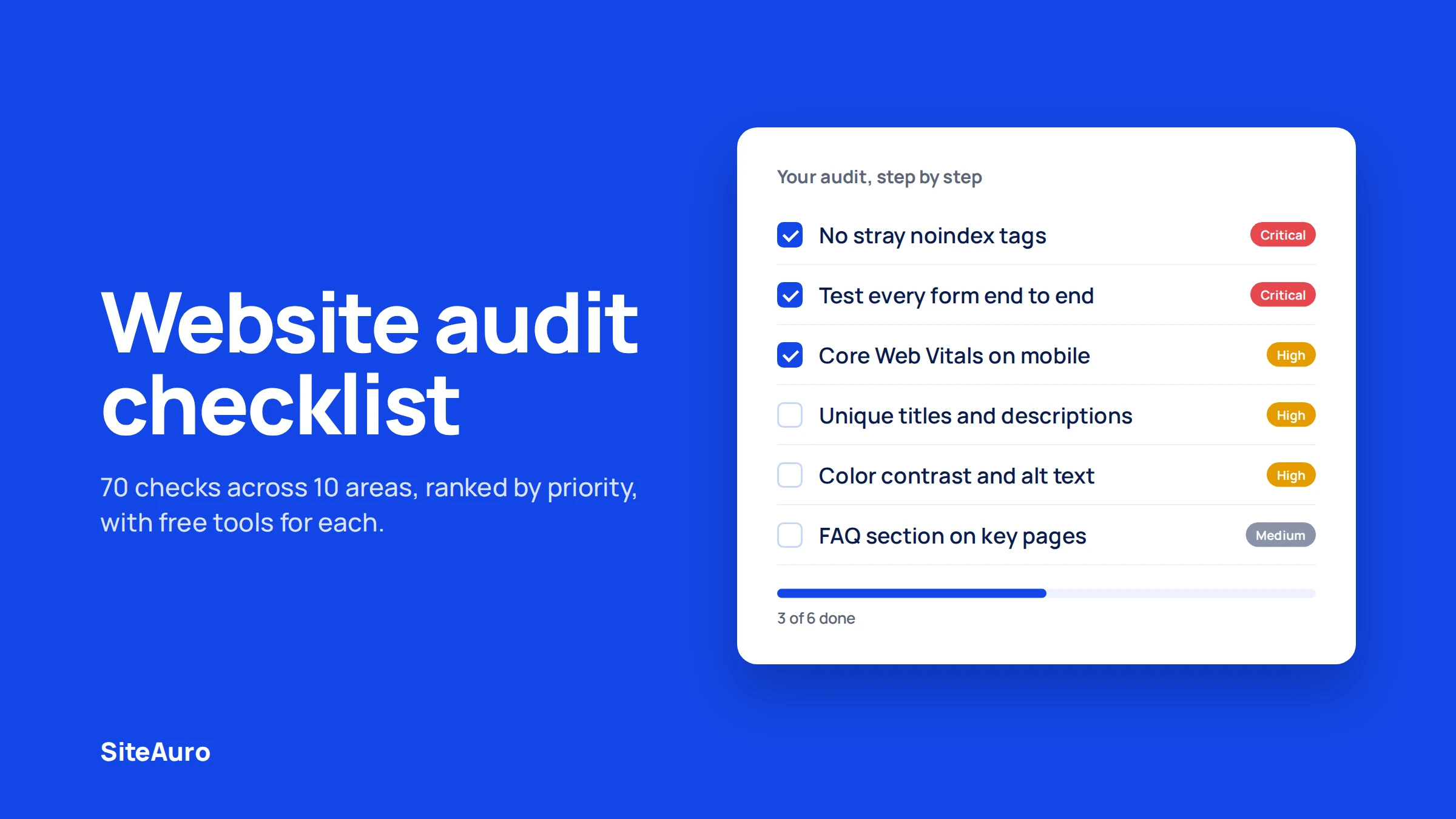
A website audit checklist is a step-by-step list of things to check on your site so you can find problems before they cost you traffic or leads. This guide gives you 70 checks across 10 areas, from crawling and speed to conversions and AI search.
Most checklists stop at "fix your meta tags." This one also shows you which fixes matter most, how to run a quick 30-minute version, and how to turn your findings into a report someone will actually read.
Every item has a priority label, so you know where to start:
- Critical: Fix now. This blocks rankings, visitors, or leads.
- High: Fix this month. Clear impact on traffic or conversions.
- Medium: Fix when you can. Small gains that add up.
What Is a Website Audit?
A website audit is a full health check of your website. It looks at how fast your site loads, whether search engines can find your pages, how easy the site is to use, and whether visitors turn into leads.
Think of it like a car service. You don't wait for the engine to stop. You check the parts on a schedule, so small problems don't become big ones.
A good audit ends with a list of fixes, ranked by how much each one matters. Without that list, an audit is just a pile of data.
Types of website audits
Most "website audits" are really several smaller audits put together. Here is what each one covers.
| Audit type | What it checks | Who usually runs it |
|---|---|---|
| Technical SEO audit | Crawling, indexing, redirects, sitemaps | SEO teams, developers |
| On-page SEO audit | Titles, headings, keywords, internal links | SEO teams, content teams |
| Content audit | Quality, freshness, gaps, thin pages | Content teams |
| Performance audit | Page speed, Core Web Vitals | Developers |
| UX audit | Navigation, forms, design, mobile use | Designers, product teams |
| Conversion audit | CTAs, lead capture, funnel drop-off | Growth and marketing teams |
| Security audit | HTTPS, updates, backups, logins | Developers, IT |
| Accessibility audit | Contrast, alt text, keyboard use, labels | Developers, accessibility specialists |
This checklist covers all eight, plus one newer area: AI search visibility.
How Often Should You Audit Your Website?
Run a full website audit at least once a year. Run a quick mini audit every month.
Some events should trigger a full audit right away, no matter your schedule:
- Before and after a redesign or platform move
- After a sudden drop in traffic or leads
- After a major Google update hits your rankings
- Before you start a big ad campaign (so you don't pay to send people to a broken page)
- When you take on a new client site, if you run an agency
Big sites with thousands of pages or frequent updates need audits more often. Every quarter is a safe rhythm.
Tools You Need for a Website Audit
You can run most of this checklist with free tools. Paid tools save time on bigger sites.
| Tool | What it helps with | Cost |
|---|---|---|
| Google Search Console | Indexing, errors, search queries, Core Web Vitals | Free |
| PageSpeed Insights | Speed and Core Web Vitals per page | Free |
| Google Analytics 4 | Traffic, engagement, conversions | Free |
| Screaming Frog SEO Spider | Full site crawl, broken links, redirects, metadata | Free up to 500 URLs, then paid |
| WAVE | Accessibility errors on a page | Free |
| Semrush or Ahrefs | Site audits, backlinks, keyword gaps | Paid |
| SSL checker (any) | Certificate status and expiry | Free |
In practice, Search Console plus a crawler like Screaming Frog will catch most of the technical issues on a small or mid-size site. Start there.
The Complete Website Audit Checklist
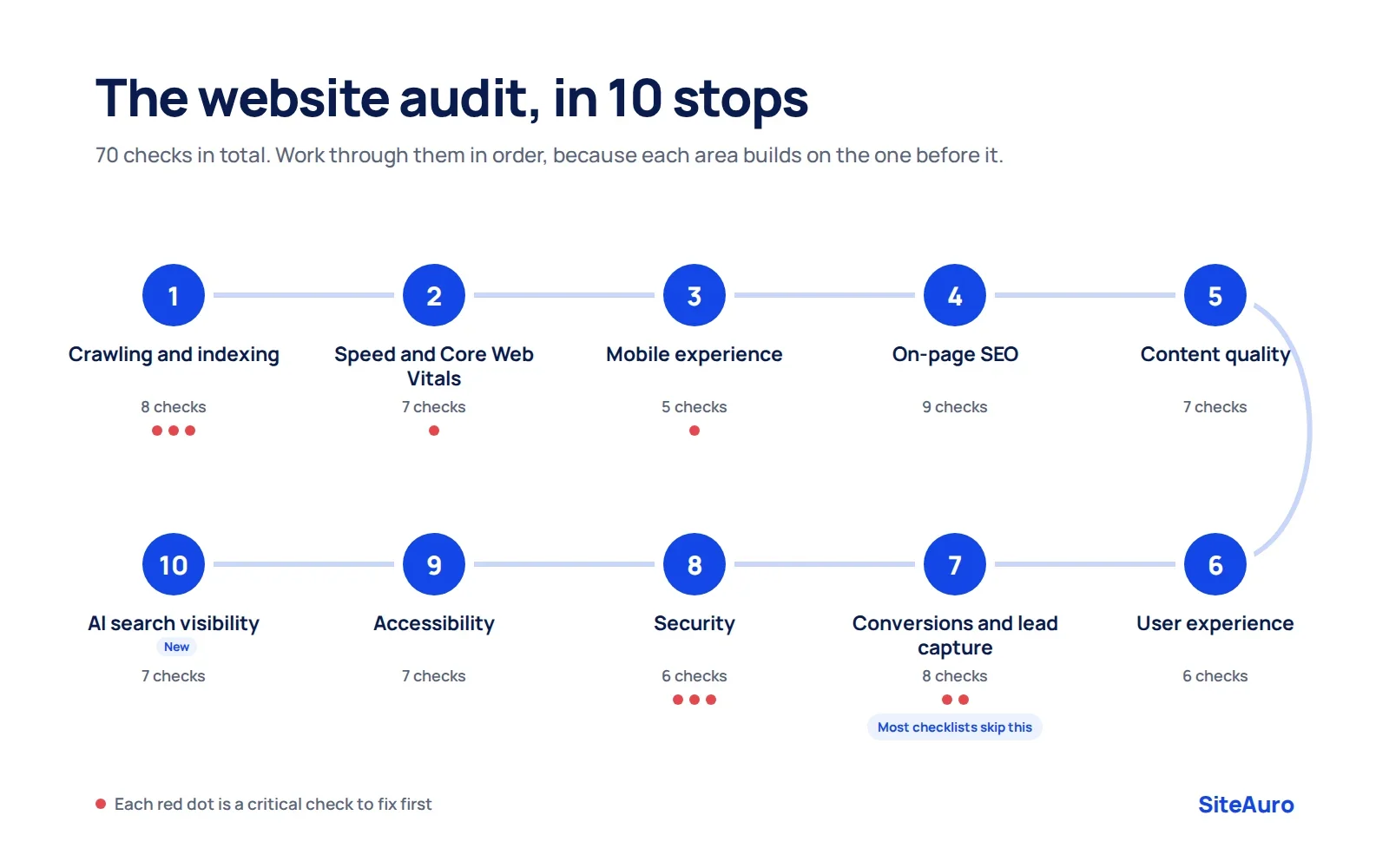
Work through these sections in order. Each one builds on the last. There is no point polishing page titles if Google can't crawl the page in the first place.
1. Crawlability and Indexing (8 checks)
Crawlability is whether search engines can reach your pages. Indexing is whether they store those pages so they can show up in results. If this part is broken, nothing else in your audit matters.
- Critical Check Search Console's Pages report for pages that are "Crawled, currently not indexed" or "Excluded" by mistake.
- Critical Make sure robots.txt is not blocking pages you want in search.
- Critical Look for stray "noindex" tags on important pages. These often get left behind after a site goes live.
- High Confirm your XML sitemap exists, is submitted in Search Console, and lists only pages you want indexed.
- High Crawl the site and fix broken internal links (404 errors).
- High Flatten redirect chains. A link should go from A to B, not A to B to C to D.
- High Check canonical tags point to the right version of each page.
- Medium Find orphan pages (pages with no internal links pointing to them) and link to them from related content.
Tip: Search site:yourdomain.com in Google. If the number of results is far lower than your real page count, you likely have an indexing problem.
2. Page Speed and Core Web Vitals (7 checks)
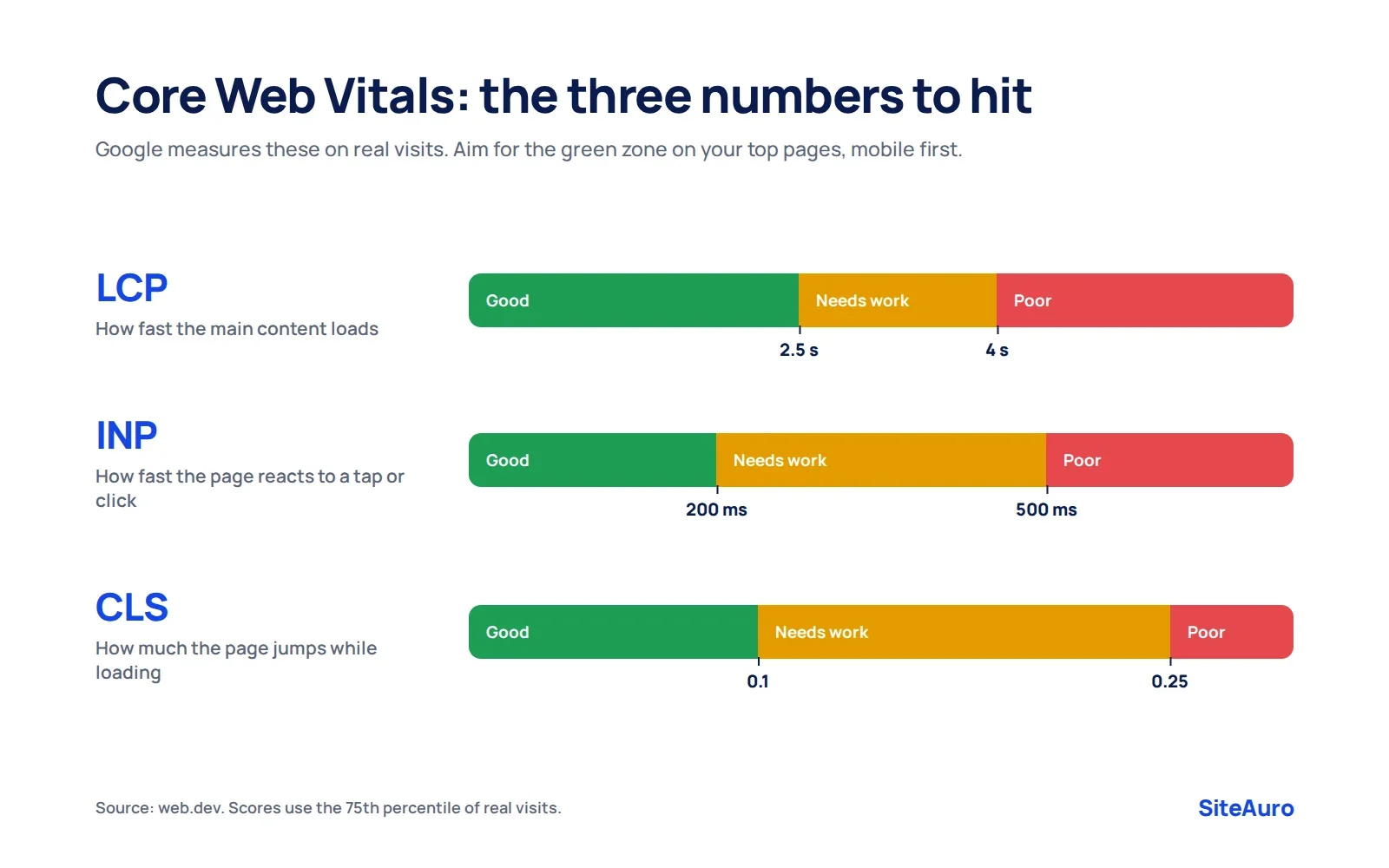
Core Web Vitals are three Google metrics that measure how a page feels to real visitors: how fast it loads, how fast it responds, and how stable it looks while loading. Google uses them as part of its page experience signals.
Here are the "good" targets, measured at the 75th percentile of real visits (web.dev):
| Metric | What it measures | Good | Poor |
|---|---|---|---|
| Largest Contentful Paint (LCP) | How fast the main content loads | 2.5 seconds or less | Over 4 seconds |
| Interaction to Next Paint (INP) | How fast the page reacts to a click or tap | 200 ms or less | Over 500 ms |
| Cumulative Layout Shift (CLS) | How much the page jumps around while loading | 0.1 or less | Over 0.25 |
- Critical Test your top 10 traffic pages and your key landing pages in PageSpeed Insights, on mobile first.
- High Check the Core Web Vitals report in Search Console for groups of failing URLs.
- High Compress and resize large images. Use modern formats like WebP or AVIF.
- High Don't lazy-load the main hero image. It is usually the LCP element, and lazy-loading it slows LCP down.
- Medium Set width and height on images, videos, and embeds so the layout doesn't jump.
- Medium Remove or delay third-party scripts you don't need (old chat widgets, unused tracking tags).
- Medium Turn on caching and use a CDN if your visitors come from many countries.
Note: The 0 to 100 score in PageSpeed Insights is a lab test. Your real Core Web Vitals result comes from the field data section, based on actual visitors.
3. Mobile Experience (5 checks)
Google uses the mobile version of your site for indexing and ranking. So your mobile site is your real site.
- Critical Open your top pages on a real phone. Check that nothing is cut off, overlapping, or hidden.
- High Make sure buttons and links are big enough to tap without hitting the wrong one.
- High Confirm the mobile version has the same main content as desktop. Hidden mobile content can be missed.
- Medium Check that text is readable without zooming (16px body text is a common baseline).
- Medium Test forms on mobile. Use the right keyboard type for email and phone fields.
4. On-Page SEO (9 checks)
On-page SEO is everything on the page itself that helps search engines understand what the page is about. These are some of the easiest wins in any audit.
- High Every indexable page has a unique title tag, under about 60 characters, with the main keyword near the front.
- High Every page has a unique meta description, under about 155 characters, that gives people a reason to click.
- High Each page has one clear H1 that matches what the page is about.
- High Headings (H2, H3) follow a logical order and are not used just for styling.
- High Check for keyword cannibalization, where two of your pages compete for the same search term. Merge or refocus them.
- Medium URLs are short, readable, and use hyphens (for example,
/blog/website-audit-checklist). - Medium Images have descriptive alt text.
- Medium Important pages get internal links from related pages, with clear anchor text.
- Medium Add schema markup where it fits (Organization, Article, Product, FAQ, LocalBusiness).
5. Content Quality (7 checks)
Content quality is whether each page actually helps the person who lands on it. Rankings bring visitors in. Content decides if they stay.
- High Find thin pages with little useful content. Improve them, merge them, or remove them.
- High Update old stats, dates, screenshots, and product details. Outdated pages lose trust fast.
- High Check pages with high impressions but low clicks in Search Console. Rewrite their titles and descriptions.
- High Look for content gaps: topics your audience searches for that you don't cover, but competitors do.
- Medium Make content easy to scan with short paragraphs, clear subheadings, and lists.
- Medium Show who wrote the content and why they know the topic (author bios, real examples).
- Medium Remove or redirect duplicate pages that say the same thing.
6. User Experience (6 checks)
User experience (UX) is how easy and pleasant your site is to use. A page can rank well and still lose people if it is confusing.
- High A first-time visitor can tell what you do within five seconds of landing on your homepage.
- High Main navigation is simple, with clear labels. Visitors can reach any key page in about three clicks.
- High Pop-ups don't cover the main content on mobile or make the page hard to close.
- Medium Fonts, button styles, and colors are consistent across pages.
- Medium Your 404 page helps people find their way back (search box, links to top pages).
- Medium Site search, if you have it, returns useful results.
Tip: Ask someone who has never seen your site to complete one task, like "find the pricing" or "contact the team." Watch without helping. You will learn more in 10 minutes than from a week of reports.
7. Conversion and Lead Capture (8 checks)
A conversion audit checks whether your website turns visitors into leads, signups, or customers. This is the part most website audit checklists skip. It is also the part that is tied most closely to revenue.
Traffic is only useful if some of it turns into business. A site can pass every technical check and still lose most of its visitors without a trace.
- Critical Every key page has one clear next step (a call to action). Not five competing ones.
- Critical Test every form yourself. Submit it, and confirm the lead actually arrives where it should.
- High Forms ask only for what you truly need. Every extra field is a reason to leave.
- High Your lead magnet gives real value in return for an email. "Contact us" and "Subscribe to our newsletter" rarely feel like a fair trade.
- High Check conversion tracking in GA4. Make sure form submissions and signups are recorded as key events.
- High Look at which pages get the most traffic but the fewest conversions. These are your biggest opportunities.
- Medium New leads get a follow-up email right away, not days later.
- Medium Trust signals (reviews, client logos, case studies) sit near your calls to action.
We've seen this pattern often while building SaaS products. Sites with good traffic still fail to convert, because the only offer on the page is a generic form. Fixing that offer often matters more than any speed tweak.
8. Security (6 checks)
A security audit checks that your site and your visitors' data are safe. One hacked site can undo years of SEO work.
- Critical The whole site loads on HTTPS, with no "mixed content" warnings.
- Critical Your SSL certificate is valid and not close to expiring.
- Critical Your CMS, themes, and plugins are up to date. Old versions are a common way in for attackers.
- High You have recent backups, and you have tested restoring one at least once.
- High Admin accounts use strong passwords and two-factor login.
- Medium Remove old user accounts and plugins nobody uses.
9. Accessibility (7 checks)
Accessibility means people with disabilities can use your site, including people who use screen readers or only a keyboard. It also tends to improve SEO and usability for everyone.
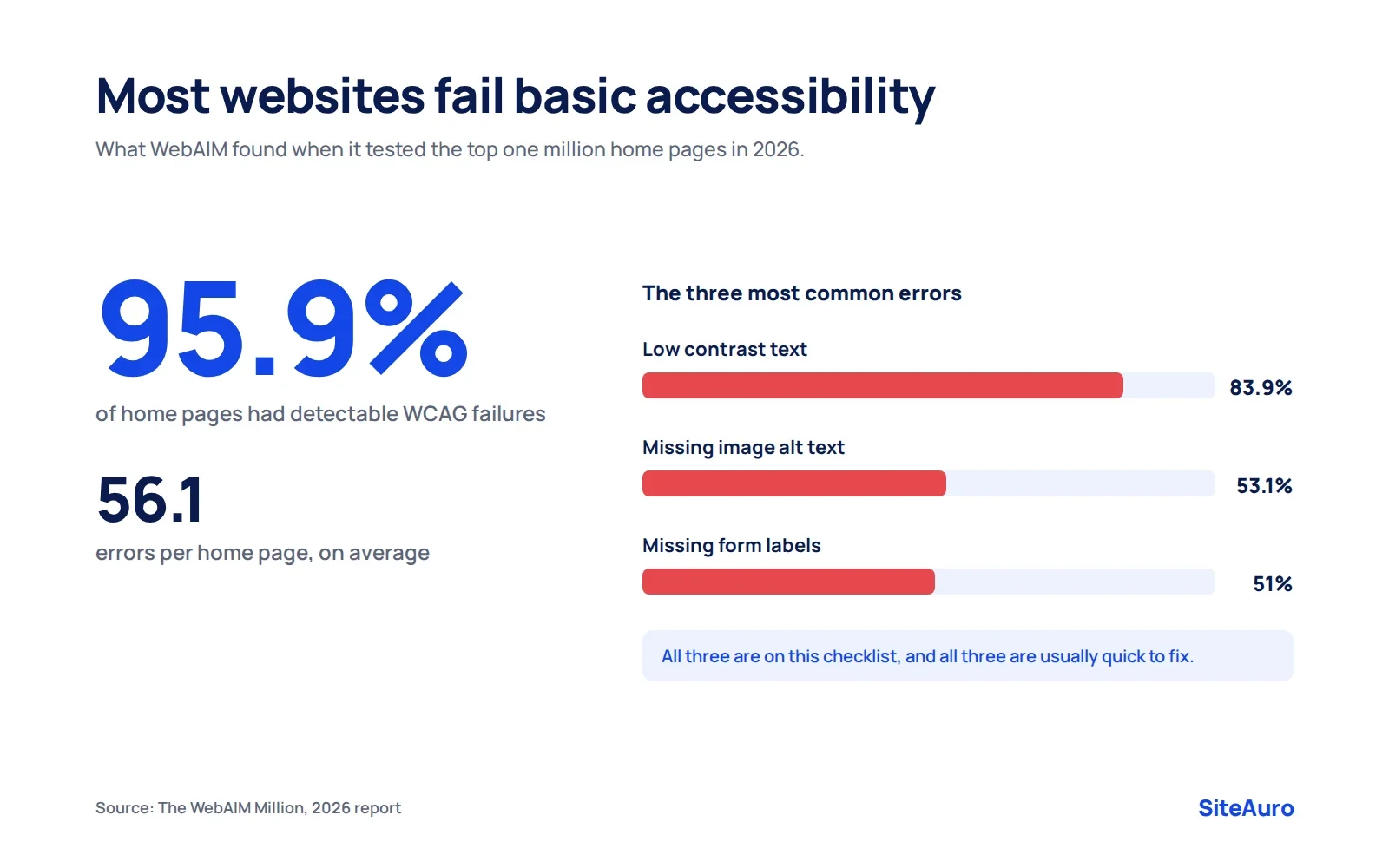
The problem is very common. In WebAIM's 2026 study of the top one million home pages, 95.9% had detectable WCAG failures, with an average of 56.1 errors per page (WebAIM Million 2026). Low contrast text was the most common issue, found on 83.9% of pages, followed by missing image alt text (53.1%) and missing form labels (51%).
- High Text has enough color contrast against its background.
- High Meaningful images have alt text. Decorative images use empty alt text (
alt=""). - High Every form field has a visible, linked label.
- High You can use the whole site with just a keyboard (Tab, Enter, Esc), with no traps.
- Medium Links and buttons have clear text. No empty buttons or "click here" links.
- Medium The page language is set in the HTML (for example,
lang="en"). - Medium Videos have captions.
Note: Automated tools like WAVE catch many issues, but not all of them. For a full accessibility review, pair a scan with manual testing.
10. AI Search Visibility (7 checks)
AI search visibility is how likely tools like ChatGPT, Perplexity, and Google's AI Overviews are to find, understand, and cite your content. This is newer, but it is quickly becoming part of a complete website audit.
The good news is that most of it builds on strong SEO basics. Clear, well-structured pages are easier for both people and AI tools to use.
- High Check robots.txt to see which AI crawlers you allow or block (for example, GPTBot, PerplexityBot, ClaudeBot, Google-Extended). Make it a deliberate choice, not an accident.
- High Key pages answer the main question in the first one or two sentences.
- High Definitions are written plainly ("X is...") so they are easy to quote.
- Medium Pages include a FAQ section with real questions as subheadings.
- Medium Important content is in plain HTML text, not locked inside images or heavy scripts.
- Medium Facts and stats link to their sources.
- Medium Your brand name, what you do, and who you serve are stated the same way across your site and profiles.
How to Prioritize What You Find
Prioritize fixes by impact and effort. Start with high-impact, low-effort fixes, then plan the bigger projects.
A full audit can surface hundreds of issues. Trying to fix them all at once is how audits end up forgotten in a folder.
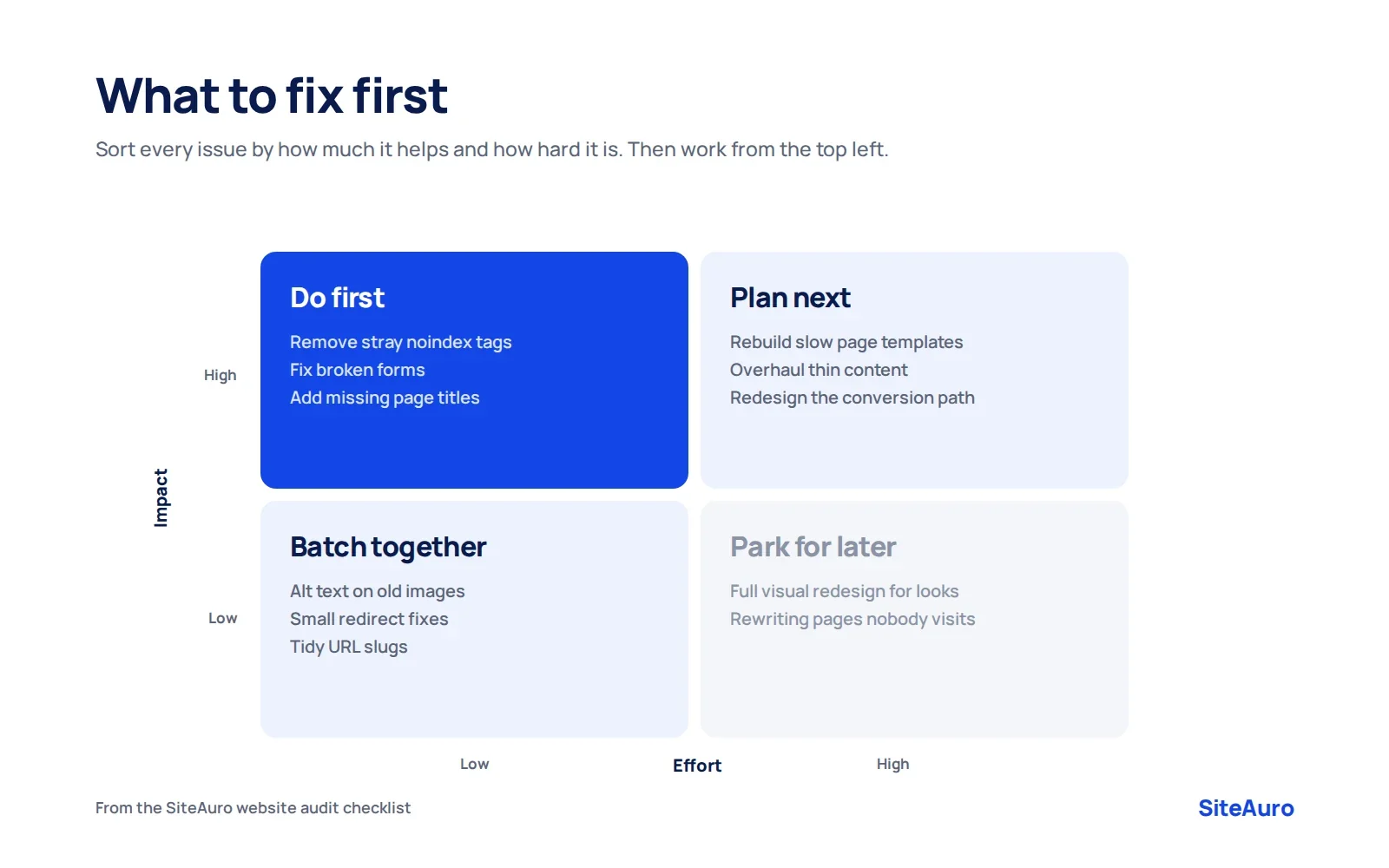
| Low effort | High effort | |
|---|---|---|
| High impact | Do first (noindex removal, broken forms, missing titles) | Plan next (site speed rebuild, content overhaul) |
| Low impact | Batch together (alt text, small redirect fixes) | Skip or park for later |
A simple order that works for most sites:
- Fix anything that blocks crawling, indexing, or lead capture.
- Fix security issues.
- Fix speed and mobile problems on your top pages.
- Improve on-page SEO and content on pages that already get impressions.
- Work through accessibility, UX, and AI visibility improvements.
The 30-Minute Mini Audit
A mini audit is a fast monthly check that catches big problems early. You don't need special tools. Just Search Console, PageSpeed Insights, and your own phone.
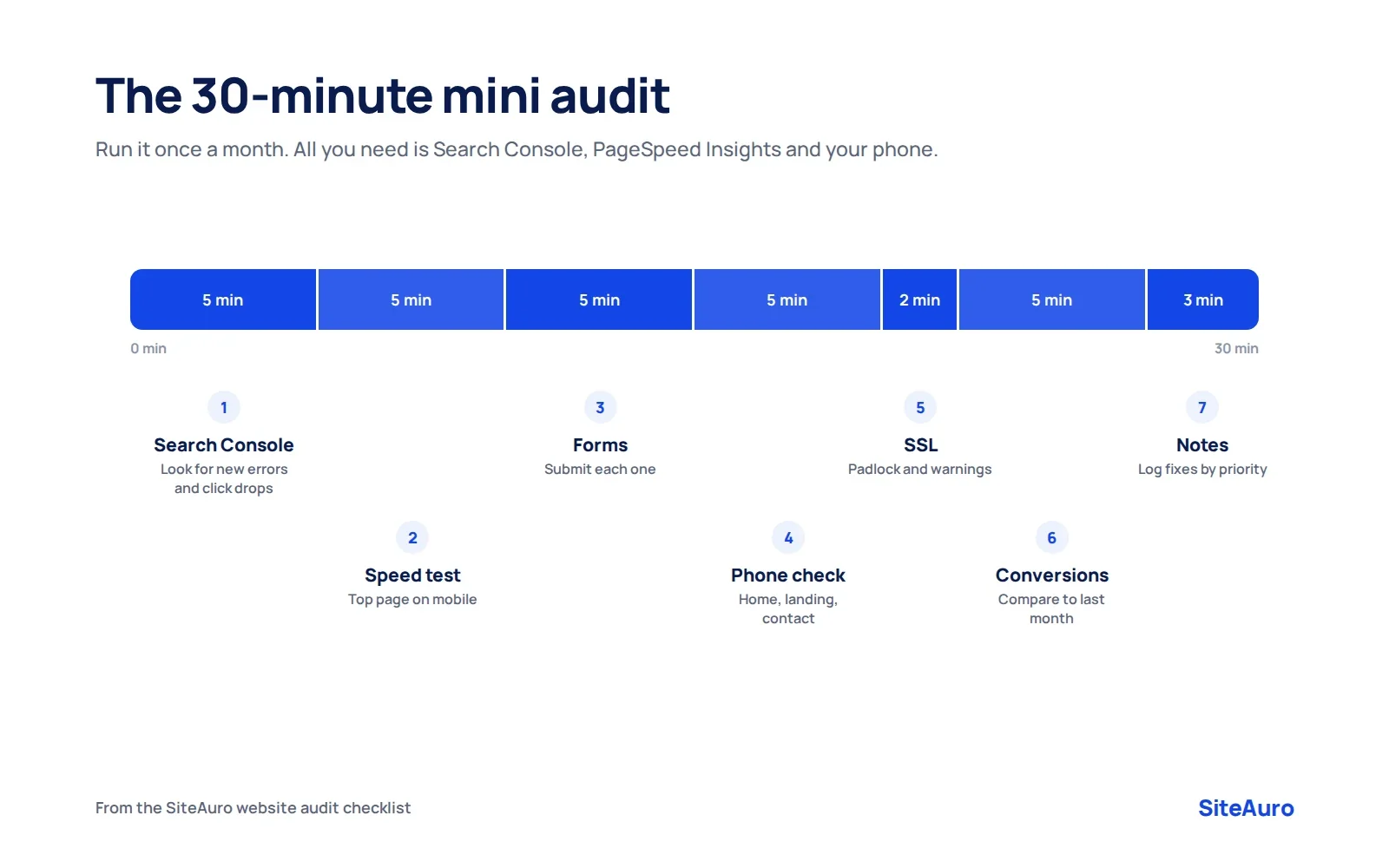
- Check Search Console (5 min). Look for new errors in the Pages report and any drop in clicks.
- Test speed on your top page (5 min). Run it through PageSpeed Insights on mobile.
- Submit every form (5 min). Make sure each lead arrives where it should.
- Browse on your phone (5 min). Visit your homepage, a key landing page, and your contact page.
- Check your SSL and site status (2 min). Look for the padlock and any browser warnings.
- Review conversions in GA4 (5 min). Compare this month's leads or signups to last month.
- Write down what you found (3 min). Add any issues to your fix list with a priority label.
How to Turn a Website Audit Into a Report People Read
An audit report is only useful if the reader understands it and acts on it. Most audit exports fail because they list 300 issues with no story.
A good website audit report does five things:
- Starts with a short summary. Three to five sentences on the site's health and the biggest risks.
- Shows a simple score per area. For example, a score for speed, SEO, UX, and security.
- Ranks issues by priority. Critical first. Medium last.
- Explains each issue in plain words. What is wrong, why it matters, and how to fix it.
- Ends with clear next steps. What to do this week, this month, and this quarter.
If you are writing the report for a client, also tie each fix to a business result they care about. "Your contact form is broken on mobile" lands harder than "Form validation error detected."
For SEO Agencies: Use the Website Audit as Your Lead Magnet
If you run an SEO agency or work as a consultant, the website audit is more than a service. It can also be the best way to win new clients.
Here is why. Most agency websites ask visitors to "Book a call" or "Contact us." That asks a stranger for their time before you have given them anything. A website audit flips it around. The visitor gets real, personal value first, and you get a warm lead who already knows what is wrong with their site.
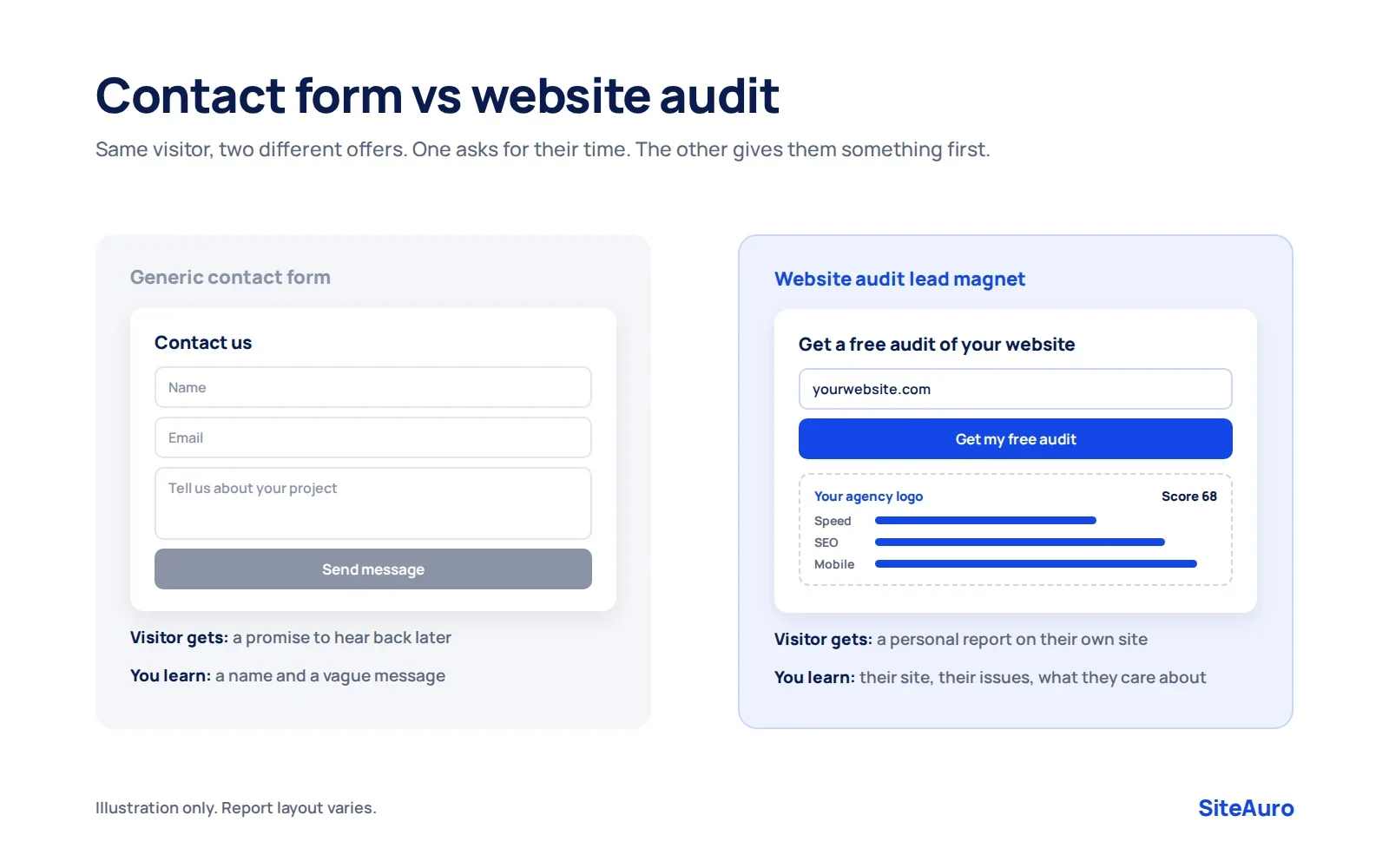
| Generic contact form | Website audit as a lead magnet | |
|---|---|---|
| What the visitor gets | A promise to "get back to you" | A personalized report about their own site |
| Effort for the visitor | Write a message from scratch | Enter a website URL |
| What you learn | A name and a vague message | Their site, their biggest issues, and what they care about |
| Sales conversation | Starts cold | Starts with their specific problems |
The catch is time. Running audits by hand for every visitor doesn't scale. That is the gap SiteAuro is built to fill.
How SiteAuro's website audit generator works
SiteAuro is a visitor intelligence and lead generation platform. For SEO agencies, its website audit generator turns your website into a lead machine:
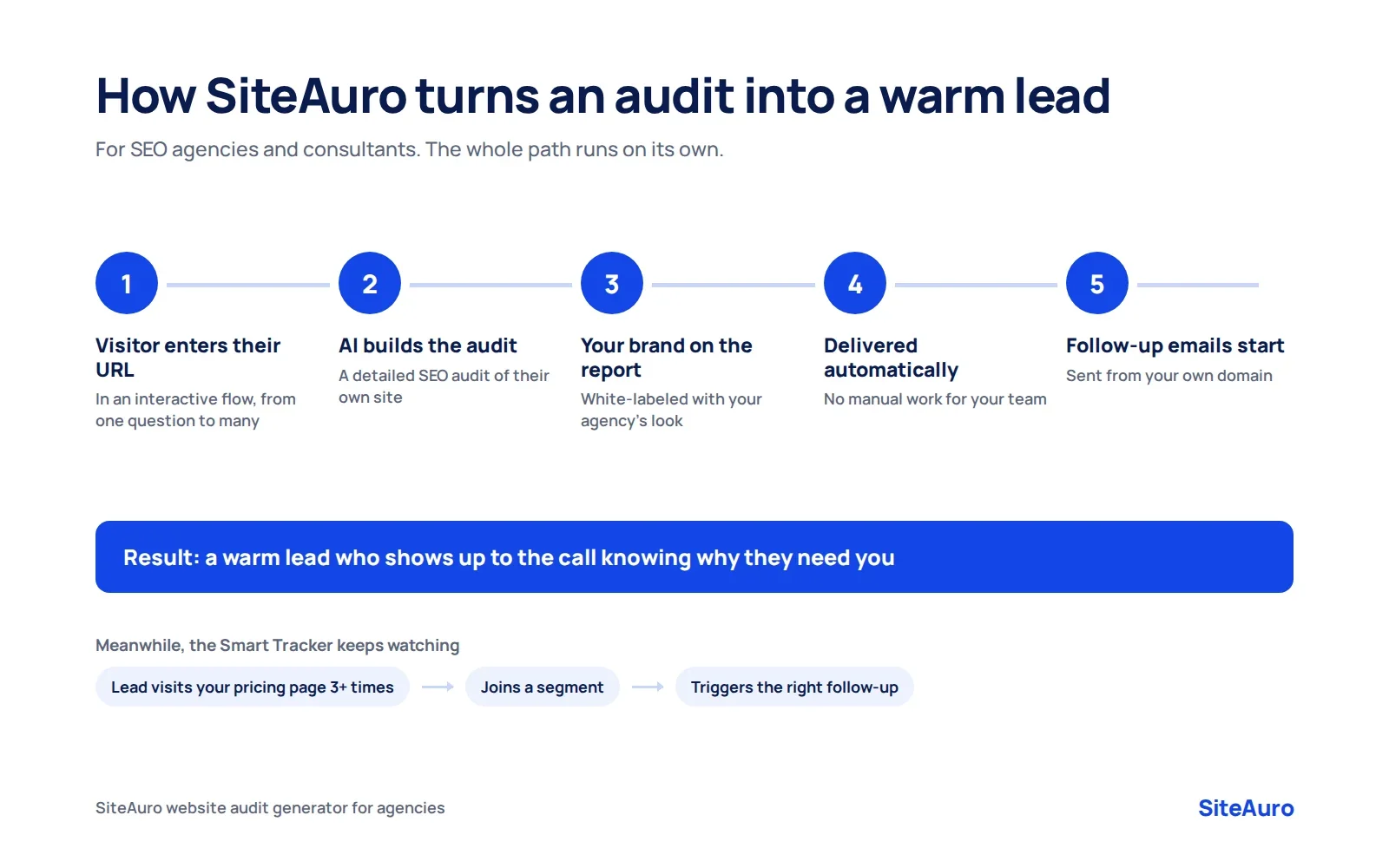
- A visitor enters their website URL. You can ask for it with an interactive flow, from a single question to a multi-step flow that also asks qualifying questions.
- AI generates a detailed, personalized SEO audit for their site.
- The report is white-labeled. It carries your agency's branding, not SiteAuro's.
- It is delivered automatically. No manual work for you.
- Follow-up starts on its own. Built-in email sequences send from your own domain through your own SMTP, so they feel personal, not automated.
Because SiteAuro tracks visitor behavior in real time, you also see what a lead does next. If someone gets their audit and then visits your pricing page three times, they can land in a segment that triggers the right follow-up. You know who is ready to talk before you pick up the phone.
The result: instead of chasing new clients, you get warm leads who show up to the call already knowing why they need you.
Get Your Free Lead Intelligence Map
Enter your website — see exactly how to turn more visitors into leads, and leads into customers.
Get Your Free Lead Intelligence MapWebsite Audit Checklist FAQ
What should a website audit checklist include?
A complete website audit checklist should cover crawlability and indexing, page speed, mobile experience, on-page SEO, content, UX, conversions, security, accessibility, and AI search visibility. Each item should have a priority so you know what to fix first.
How long does a website audit take?
A small site can be audited in a day or two with free tools. A large site with thousands of pages, or one that needs a manual accessibility review, can take several weeks. The 30-minute mini audit above is a good monthly habit in between.
Can I do a website audit for free?
Yes. Google Search Console, PageSpeed Insights, Google Analytics 4, WAVE, and the free version of Screaming Frog cover most of this checklist. Paid tools mainly save time on bigger sites and add backlink and competitor data.
What is the difference between a website audit and an SEO audit?
An SEO audit focuses only on search visibility: crawling, indexing, keywords, and links. A website audit is broader. It also covers speed, UX, conversions, security, and accessibility.
How often should I audit my website?
Run a full audit at least once a year and a mini audit every month. Also run a full audit after a redesign, a site migration, or a sudden drop in traffic or leads.
What is the most common website audit mistake?
The most common mistake is finding problems but never fixing them. Rank every issue by impact and effort, fix the critical ones first, and set a date for your next audit.
Can a website audit help an agency get new clients?
Yes. A free, personalized website audit gives prospects real value up front and shows them exactly what is wrong with their site. That makes the sales conversation much easier than starting from a cold contact form.
Website Audit Checklist: Quick Reference
| Area | Checks | Top priority item |
|---|---|---|
| Crawlability and indexing | 8 | No accidental noindex or robots.txt blocks |
| Page speed and Core Web Vitals | 7 | Test top pages on mobile |
| Mobile experience | 5 | Check key pages on a real phone |
| On-page SEO | 9 | Unique titles and meta descriptions |
| Content quality | 7 | Fix or remove thin pages |
| User experience | 6 | Clear message within five seconds |
| Conversion and lead capture | 8 | Test every form end to end |
| Security | 6 | HTTPS and up-to-date software |
| Accessibility | 7 | Contrast, alt text, form labels |
| AI search visibility | 7 | Deliberate AI crawler rules |
| Total | 70 |
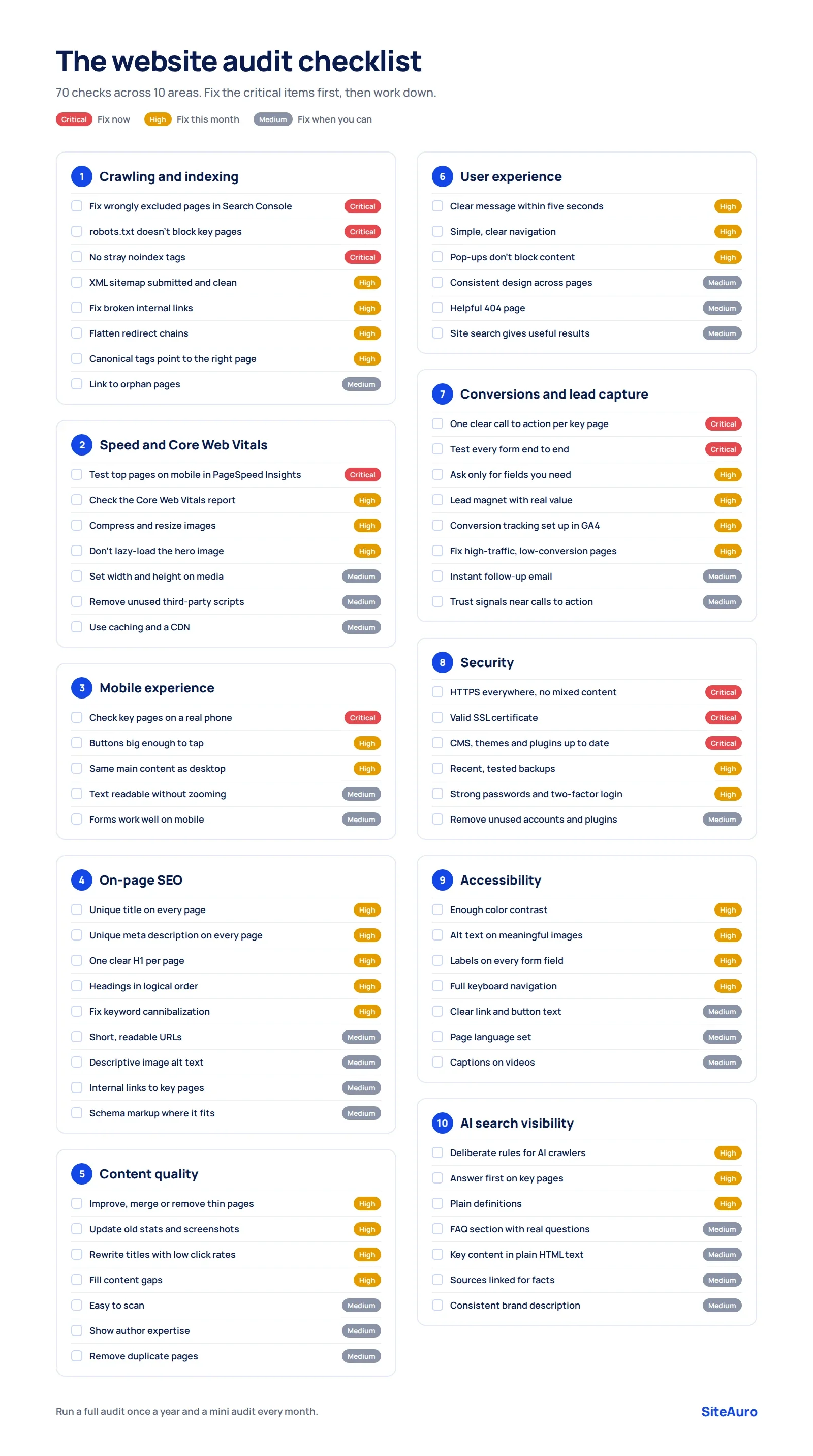
Download the printable website audit checklist (PDF)
Bookmark this page and come back to it before your next audit. Work through one section at a time, fix the critical items first, and your site will be in better shape than most of the web.
Get Your Free Lead Intelligence Map
Enter your website — see exactly how to turn more visitors into leads, and leads into customers.
Get Your Free Lead Intelligence MapSources
- Google, Web Vitals, web.dev
- WebAIM, The WebAIM Million: 2026 report

Karthick, Founder, SiteAuro
Building SaaS for Lead Generation & Conversion.