

When leads are slow, most teams try to get more traffic. More ads. More content. More SEO. But the traffic you already have is often the bigger opportunity.
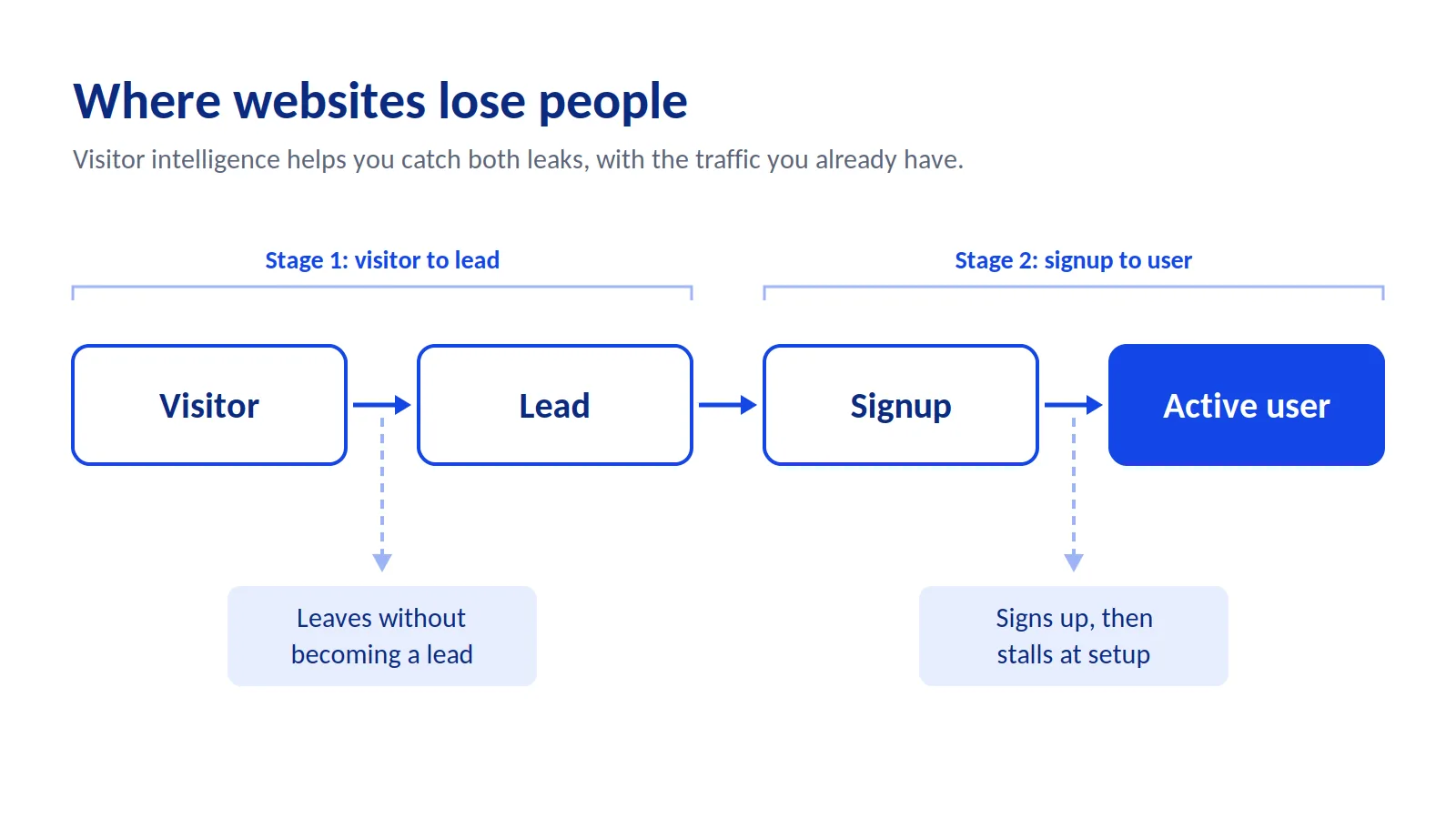
Most websites lose visitors twice. First, people leave without becoming a lead. Then, many who do sign up never finish setting up and never become real users.
Visitor intelligence helps you fix both, without adding a single new visitor. It means reading what each person does on your site and in your product, then responding with the right offer at the right moment. This guide shows you how, using a real example from VidTechy, a YouTube growth tool we built and still run.
What Is Visitor Intelligence?
Visitor intelligence is the practice of understanding what each person does on your website and inside your product, and what that behavior says about their intent.
Standard analytics gives you totals. "2,000 visits this week. 40 signups." Useful, but you can't act on a total. You don't know who those 40 people are or what they did next.
Visitor intelligence works at the level of one person. It tells you that one visitor used your free tool three times, then signed up, then stopped at step two of setup. That is something you can act on.
It does two jobs:
- Turn visitors into leads. Spot intent early and give people a reason to share their details.
- Turn signups into users. Track what people do after signup, and help them past the step where they get stuck.
Most tools only do the first job. The second job is where a lot of growth hides.
A Real Example: How VidTechy Gets More From the Same Traffic
Here is how both jobs work in practice, from a product we run every day.
Stage 1: Free tools turn traffic into leads
VidTechy helps YouTube creators grow their channels. On our website, we offer free tools that solve small pieces of the same problem: a YouTube name generator, a description generator, and other related tools.
We give full free access to these tools. No gate before the result.
This works because each tool is a small taste of the main product. A creator who uses the description generator has just felt what VidTechy does. Signing up for the full product is the obvious next step, not a leap of faith.
Stage 2: In-app tracking turns signups into users
After signup, every new VidTechy user needs to add their YouTube channel. Without a connected channel, the product can't do much for them.
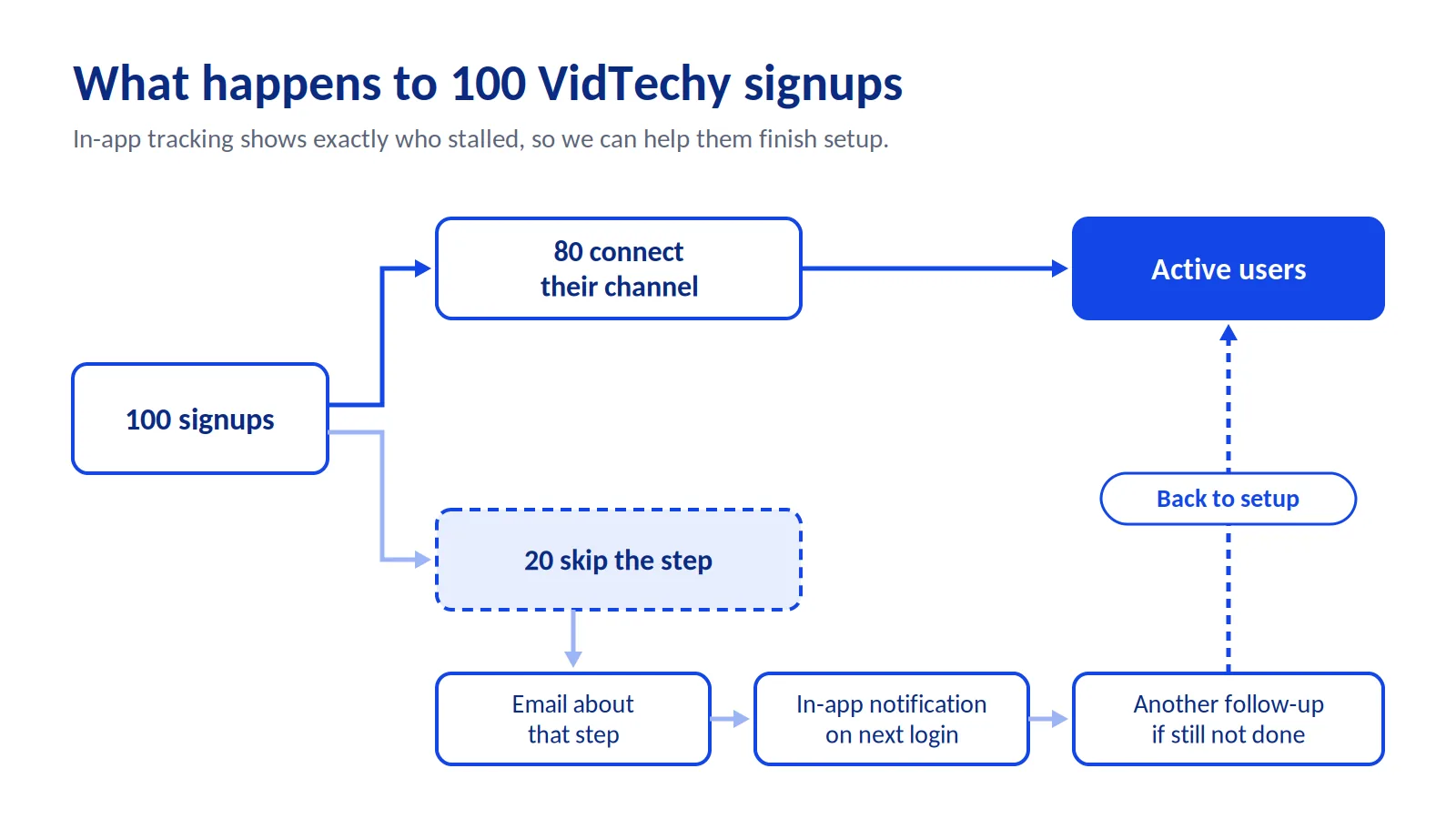
Here's what we found. Out of every 100 signups, about 20 never add their channel. They signed up, then stalled at the most important step.
A normal analytics tool shows you 100 signups and stops there. It can't tell you which 20 people stalled, so you can't help them.
With in-app tracking, we know exactly who skipped the step. So we:
- Send them an email about connecting their channel, not a generic "welcome" note.
- Show an in-app notification the next time they log in.
- Follow up again if they still haven't connected.
Each follow-up is about the one step they missed. That is what brings stalled signups back.
The results so far
| User type | Count |
|---|---|
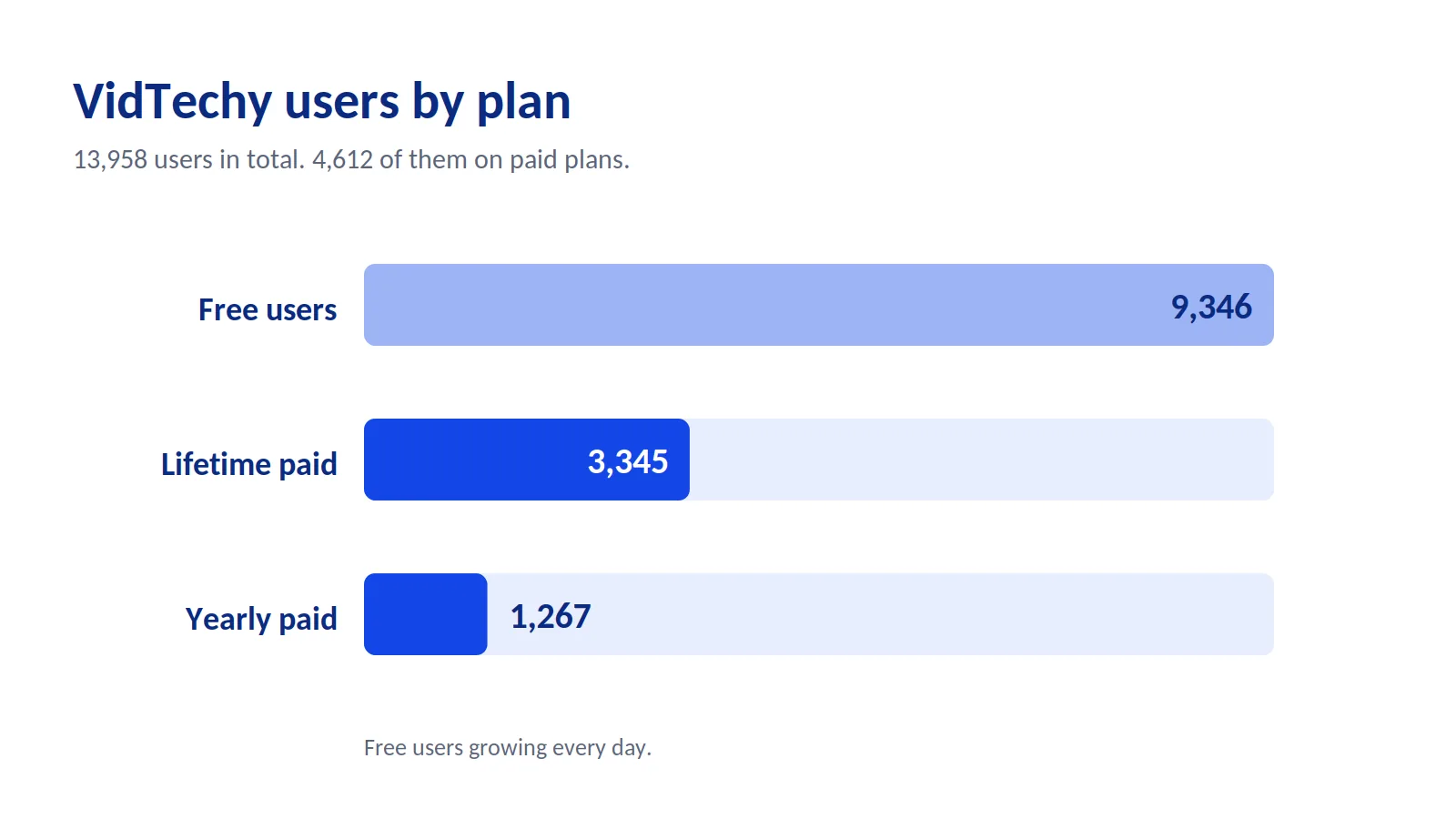
| Free users | 9,346 (growing every day) |
| Yearly paid users | 1,267 |
| Lifetime paid users | 3,345 |
| Total | 13,958 |
That is more than 4,600 paying users. The growth didn't come from chasing more visitors. It came from two simple ideas: give real value before signup, and watch what people do after it.
Step 1: Choose a Tracking Setup That Can Do Both Jobs
The right tracking setup follows each person from their first visit to their activity inside your product.
Before you pick a tool, check that it can do these six things:
| What to check | Why it matters |
|---|---|
| Tracks each visitor, not just totals | You can't act on "500 visits." You can act on one person. |
| Uses first-party tracking | Keeps working with Safari and Firefox privacy limits |
| Works inside your product, not just your website | So you can see who stalls after signup |
| Links pre-signup activity to the user's account | So you know which tool or page brought each user in |
| Lets you build segments from behavior rules | So you can group people by what they do |
| Triggers actions automatically | Emails, in-app messages, and flows fire without manual work |
If a tool misses the third or fourth item, it can only do the first job. You'll get leads, but you'll stay blind to the people who sign up and stall.
Step 2: Track the Signals That Matter
The strongest signals show what someone is trying to do. Track them at both stages.
On your website (before signup)
| Signal | What it usually means |
|---|---|
| Uses a free tool, especially more than once | Has the problem you solve |
| Visits pricing 2+ times | Comparing cost. Close to a decision. |
| Returns 2-3 times in a week | Interested but not committed |
| Moves from blog to features to pricing | Shifting from learning to buying |
| Scrolls to the bottom of key pages | Real interest, not a skim |
| Shows exit intent | About to leave. Last chance to help. |
Inside your product (after signup)
| Signal | What it usually means |
|---|---|
| Skipped a key setup step | Stuck, or unsure why the step matters |
| Hasn't logged in for several days | Losing interest |
| Uses one feature heavily | Found value. Ready for an upgrade prompt. |
| Hit a free plan limit | Strong moment to offer a paid plan |
At VidTechy, the most important in-app signal is simple: did they connect their channel or not? Find the one step in your product that every successful user completes. That is your key signal.
Step 3: Build Segments, Then Tune the Rules
A segment is a group of people who behave in a similar way. Start with a few simple segments, then adjust the rules using your own data.
Three starter segments for your website
| Segment | Starter rule | What they need |
|---|---|---|
| Hot | Visited pricing 2+ times, or used a free tool 2+ times | A trial, demo, or personalized report |
| Warm | 2+ visits, several pages read, no action yet | Proof, like a case study or a useful tool |
| Cold | First visit, short session, arrived on a blog post | Value, not a sales pitch |
One starter segment for your product
| Segment | Starter rule | What they need |
|---|---|---|
| Stalled | Signed up but skipped the key setup step | A reminder about that exact step |
Why the starter rules are only a guess
Rules like "2+ pricing visits" are a reasonable place to begin. But every site is different. A cheap tool might get bought on the first visit. A complex B2B product might take ten visits over a month.
Here is how to tune the rules:
- Look at people who already converted. Check what they did before they signed up or paid.
- Find the pattern. If most buyers visited pricing three times first, set your "hot" rule at two visits. That catches people one step before they decide.
- Check segment size. If a segment has too few people to learn from, loosen the rule. If it has too many and converts poorly, tighten it.
- Match your traffic level. Low-traffic sites should start with looser rules, like one pricing visit. High-traffic sites can be stricter.
- Review every two weeks. Change one rule at a time, so you know what made the difference.
The goal isn't a perfect rule on day one. It's a rule that gets more accurate every month.
Step 4: Use a Dynamic Lead Magnet, Not a Static One
A dynamic lead magnet gives each visitor a result based on their own input, like an audit of their website or a name for their channel.
A static lead magnet, like an ebook, gives everyone the same thing. A dynamic one gives each person something about them. That is why it converts better, and why the leads it brings are more qualified.
Use this table to pick a format:
| If your product... | Offer this type | Example |
|---|---|---|
| Analyzes something (a site, profile, channel) | Audit / Analyzer | Website SEO audit, YouTube channel audit |
| Helps people create | Generator | Channel name generator, description generator |
| Fits different people in different ways | Quiz | "Which plan fits you?" quiz |
| Saves money or time | Calculator | ROI calculator, time savings calculator |
Lead magnet ideas you can use
For SaaS founders:
- YouTube tool: A channel name or description generator, like VidTechy's.
- LinkedIn tool: A LinkedIn profile audit that scores the headline, summary, and recent posts.
- Analytics tool: A tracking setup checker that flags missing events.
- Project management tool: A quiz that recommends a workflow based on team size.
For SEO agencies and consultants:
- Website SEO audit: The visitor enters their URL and gets a report on technical issues, speed, and on-page fixes, under your agency's brand.
- Content gap report: Topics their competitors cover that they don't.
- Ranking check: Where their site ranks for a few key terms.
Add a "book a call" link to every agency report. The prospect sees your skill before you ever speak.
5 Sharper Rules for Converting More Leads
You've heard "give value first" and "follow up fast." They're true, but they're too vague to act on. Here's what they look like when you get specific.
1. Make your lead magnet a slice of your product, not a gift
"Give value first" often turns into a random ebook. That's value, but it doesn't lead anywhere.
The better test: after using your lead magnet, does the visitor want your product more? VidTechy's description generator passes that test. A creator who uses it has already done a small piece of what the full product does. A generic "YouTube tips" PDF would not.
2. Follow up on the step they skipped, not the time that passed
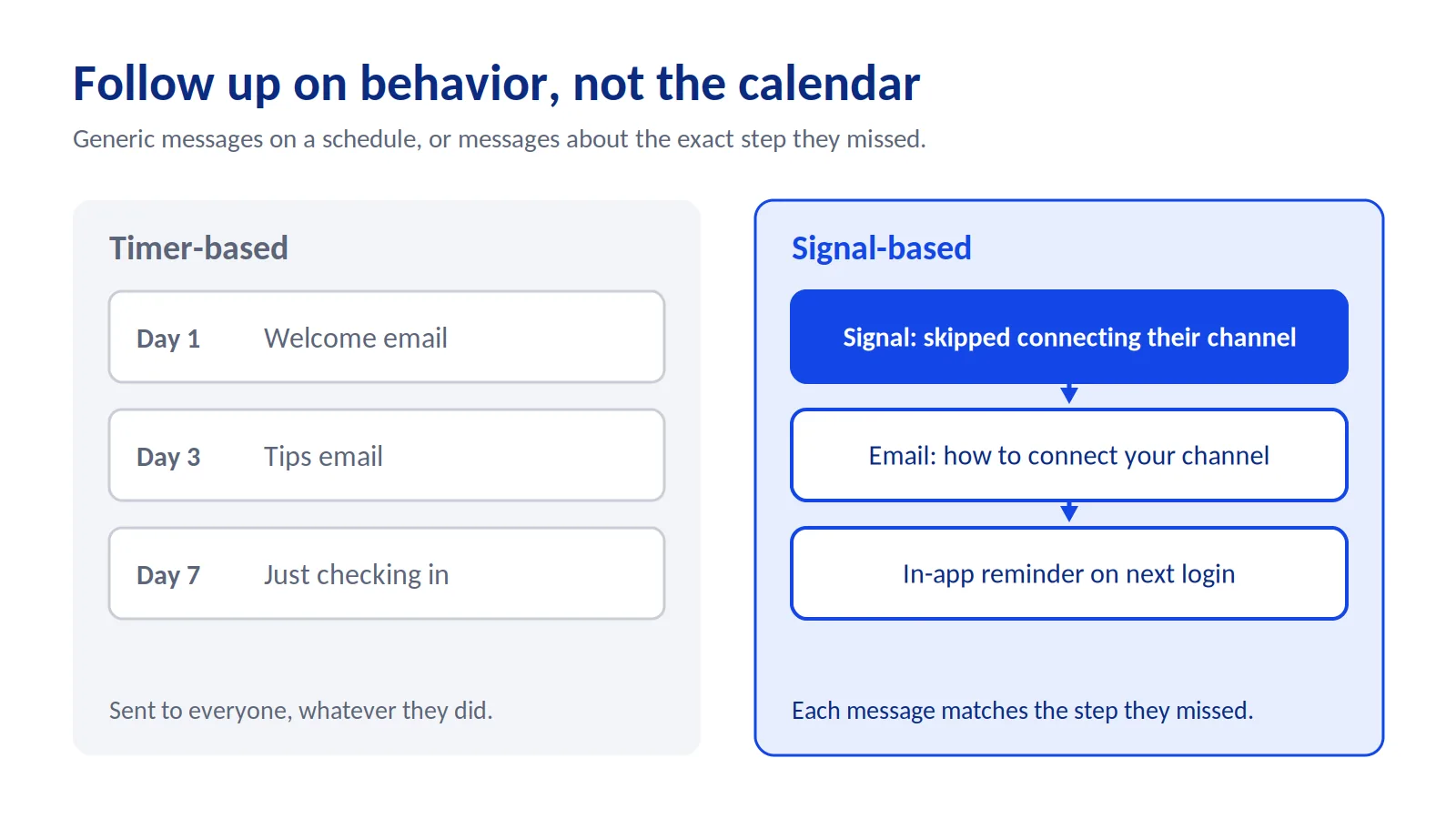
"Follow up fast" usually means a timed email series. Day 1, day 3, day 7. Everyone gets the same messages.
The sharper version: follow up on behavior. At VidTechy, the 20% who don't connect their channel get messages about connecting their channel. Nothing else. A message about the exact step someone missed is far more useful than "Just checking in!"
3. Treat signup as the halfway point, not the finish line
Most teams celebrate a signup and move on. But a signup who never finishes setup is not a user. They will never pay.
Track what happens after signup with the same care you give to your website. Find the step where people stall, and build your follow-up around it.
4. Trigger on a signal, not a timer
A popup that fires five seconds after someone lands feels pushy, because it ignores what they're doing.
Wait for a signal instead. A second pricing visit. A third use of a free tool. Scrolling to the end of a feature page. The offer then shows up when it actually makes sense.
5. Ask one qualifying question with every lead
An email address alone tells your sales team nothing. Add one question that matters, like team size or main goal.
One question barely lowers your conversion rate, and it turns a name into a lead your team can actually talk to.
How to Measure If It's Working
Track numbers at both stages. Check them every two weeks.
| Metric | How to calculate it | What it tells you |
|---|---|---|
| Lead capture rate | Leads ÷ visitors, per page | Which pages turn traffic into leads |
| Lead magnet conversion rate | Signups ÷ lead magnet users | Whether your lead magnet points to your product |
| Setup completion rate | Users who finish key step ÷ signups | How many signups become real users |
| Recovery rate | Stalled users who finish setup after follow-up ÷ stalled users | Whether your in-app follow-ups work |
| Free-to-paid rate | Paid users ÷ total signups | Whether the whole funnel is working |
A lead and a signup are not the same thing. A lead shared contact details. A signup created an account. Some people go from lead to signup after a few emails. Others sign up directly. Track both paths, so you know exactly where people drop off.
Doing This With SiteAuro
We built SiteAuro because we needed this for our own products. Everything in this guide works with any tool that covers the checklist in Step 1. SiteAuro does all six in one place.
- Tracking: It tracks each visitor with first-party cookies that keep working with Safari and Firefox limits.
- One snippet, two jobs: The same snippet works on your website and inside your logged-in product. It links each user's pre-signup activity to their account.
- Segments: You set the rules, and people are grouped as they browse or use your product.
- Actions: Each segment can trigger an email sequence, an interactive flow, an on-page widget, or personalized content.
- Dynamic lead magnets: It scans your site and recommends a lead magnet that fits your product. You can build audits, generators, quizzes, and calculators under your own brand.
- For agencies: Visitors get a white-labeled SEO audit, delivered under your agency's brand.
Emails send from your own domain through your SMTP. Leads can flow to your other tools through Zapier or Webhook.
Frequently Asked Questions
What is the difference between visitor intelligence and web analytics?
Web analytics reports totals across all your traffic. Visitor intelligence shows what each person does, on your site and in your product, so you can respond while it still matters.
Why should I track users after they sign up?
Because many signups never become active users. At VidTechy, about 20 out of every 100 signups don't complete the key setup step. Without in-app tracking, you can't tell who they are or help them.
Should I give my free tool away with no email gate?
It depends on your goal. VidTechy gives full free access, and the tools still bring in signups because they show the value of the main product. If your tool is closely tied to your product, an open tool can build more trust than a gated one.
How many segments do I need?
Start with four: hot, warm, and cold on your website, plus one "stalled" segment in your product. Add more only when you see a clear pattern.
Is tracking user behavior allowed under privacy laws?
It depends on where your users are. Most regions require a clear privacy policy, and some, like the EU, require consent before setting tracking cookies. Check the rules that apply to your audience.
How long before I see results?
Give each change at least two weeks of traffic before you judge it. Low-traffic sites may need longer.
Start With the Traffic You Already Have
You don't need more visitors to get more leads. You need to stop losing the ones you already have.
You also don't need to fix everything at once. Pick one leak: the page where visitors leave, or the setup step where signups stall. Add one segment and one follow-up. Measure for two weeks, then build from there.
Want to see how many leads your current traffic could be giving you? Enter your URL, and SiteAuro will scan your site and show you where you're losing leads today.
Get your free Lead Intelligence Map
Karthick, Founder, SiteAuro
Building SaaS for Lead Generation & Conversion.