
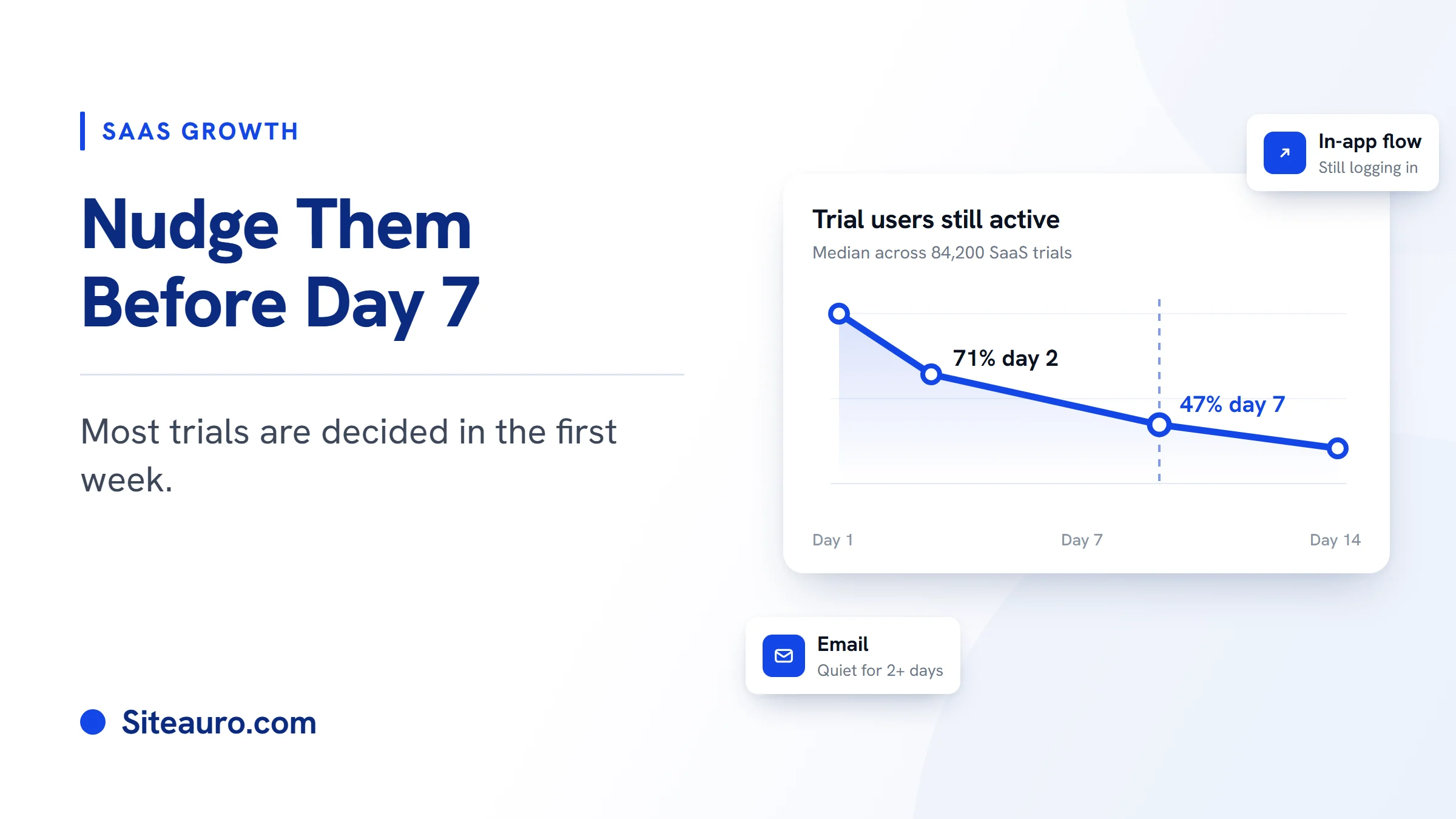
Someone signs up for your trial. They log in once, click around, and leave. You never hear from them again.
That silence is the biggest leak in trial to paid conversion. The fix is not more emails. It's knowing who went quiet, why, and what to send them before day 7.
This guide shows you how. We'll cover what "active" really means, how to group trial users by what they actually do, when to use email versus an in-app nudge, and how to write a trial expiration email that works.
Why trials stall in week one
Trials stall because most users decide in the first few days. The ones who don't find value early rarely come back.
A study of 84,200 trials across 38 SaaS companies shows how fast this happens. By day 2, only 71% of trial users were still active. By day 7, just 47% were left (Visionary Marketing, 2026).
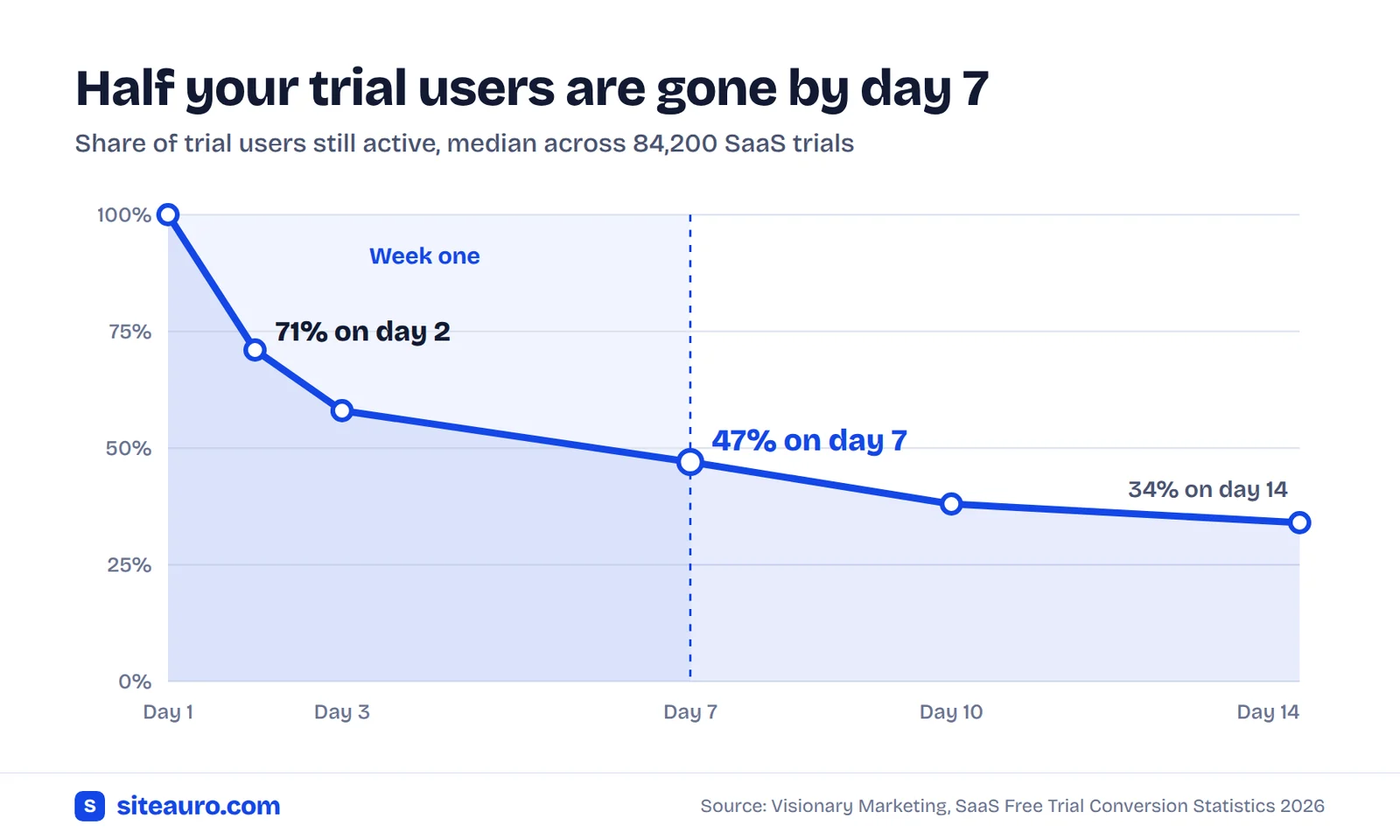
The same study found that 83% of users who ever activate do it by day 7. After that, it rarely happens. And users who activated on day 1 converted 47% better than users who activated later.
So the window is short. If you wait until "3 days left" to reach out, most of your quiet users are already gone.
The calendar problem
Most trial emails go out on a fixed schedule. Day 1, day 3, day 7. Everyone gets the same email, no matter what they did.
In the 84,200-trial study, calendar-based emails lifted conversion by 14%. Emails timed to what users actually did lifted it by 22%. One founder who reviewed 20,000 of his own trials found that a polished, generic email drip barely moved paid conversion at all.
The lesson is simple. Timing by behavior beats timing by calendar.
What "active" really means for your product
An active trial user is someone who completed your activation event. An activation event is the one action that shows a user got real value from your product.
Logging in is not activation. Clicking around is not activation. A user can do both and still never see why your product matters.
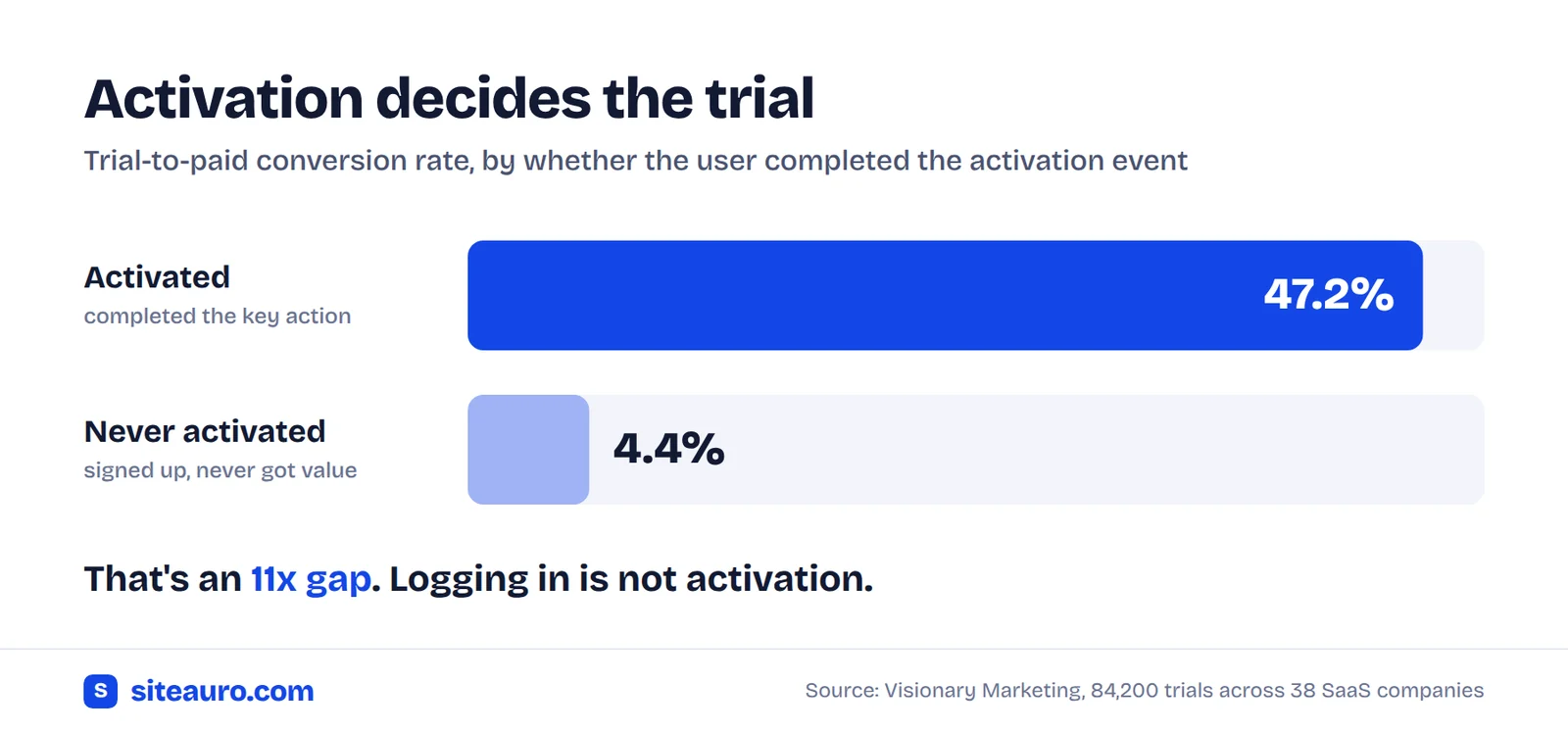
The gap is huge. In the 84,200-trial study, users who activated converted at 47.2%. Users who never activated converted at 4.4%. That's an 11x difference.
| Product type | Example activation event |
|---|---|
| SEO audit tool | Runs a first audit on their own site |
| YouTube growth tool | Connects their YouTube channel |
| CRM | Imports their contacts |
| Analytics tool | Installs the tracking code and sees first data |
| Email marketing tool | Sends a first campaign |
| Invoicing tool | Sends a first invoice to a real client |
We see this every day at VidTechy, a YouTube growth tool we run. A new user can't get much value until they connect their YouTube channel. So that's our activation event. About 20 of every 100 people who sign up never do it.
To find your activation event, look at your paying customers. What did almost all of them do early on that non-payers skipped? Pick that one action. If you can't name it in one sentence, you can't build segments around it.
What you already know before they sign up
You already know a lot about a trial user before they sign up. Most tools just lose it at the signup form.
Your marketing site sees which pages someone read, how often they came back, and whether they checked pricing. Then they sign up, and most product tools start from zero. Most marketing tools stop tracking at that same moment.
SiteAuro handles both sides with one snippet. We call it "one snippet, two jobs." The same tracking code runs on your marketing site and inside your logged-in app. When a user logs in, you call Siteauro.identify(). That links everything they did before signup to their new account.
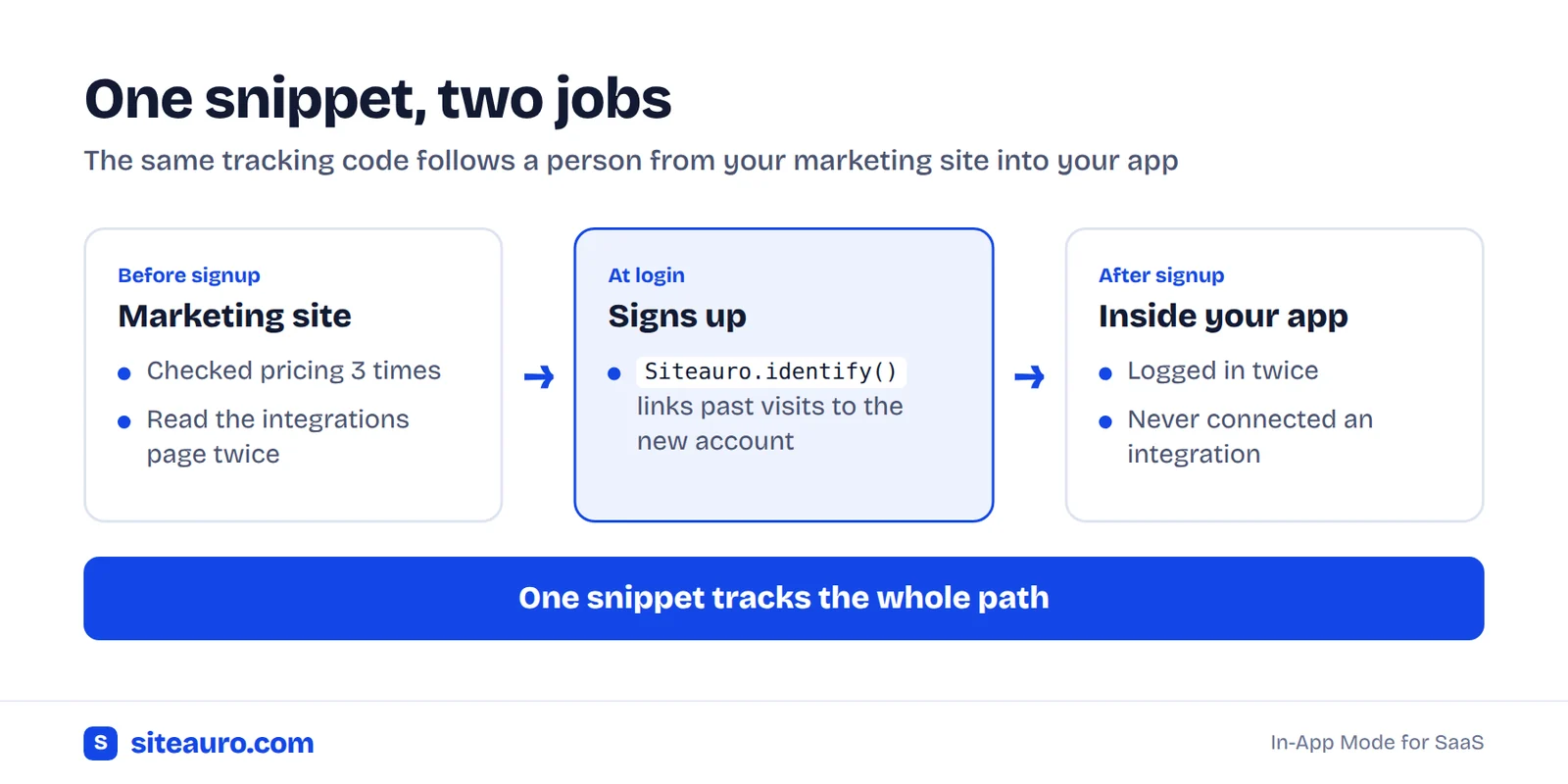
Now this trial user isn't just "signed up 3 days ago." They're "checked pricing 3 times, read about integrations, signed up, then never connected anything." That's a very different person. They need a very different message.
Pre-signup signals worth tracking:
- Pricing page visits. Repeat visits usually mean real buying intent.
- Feature or use-case pages read. These tell you why they signed up.
- Comparison pages. They're weighing you against another tool.
- Which free tool or guide they used. This shows the problem they came to solve.
- Time from first visit to signup. Fast deciders and slow researchers need different nudges.
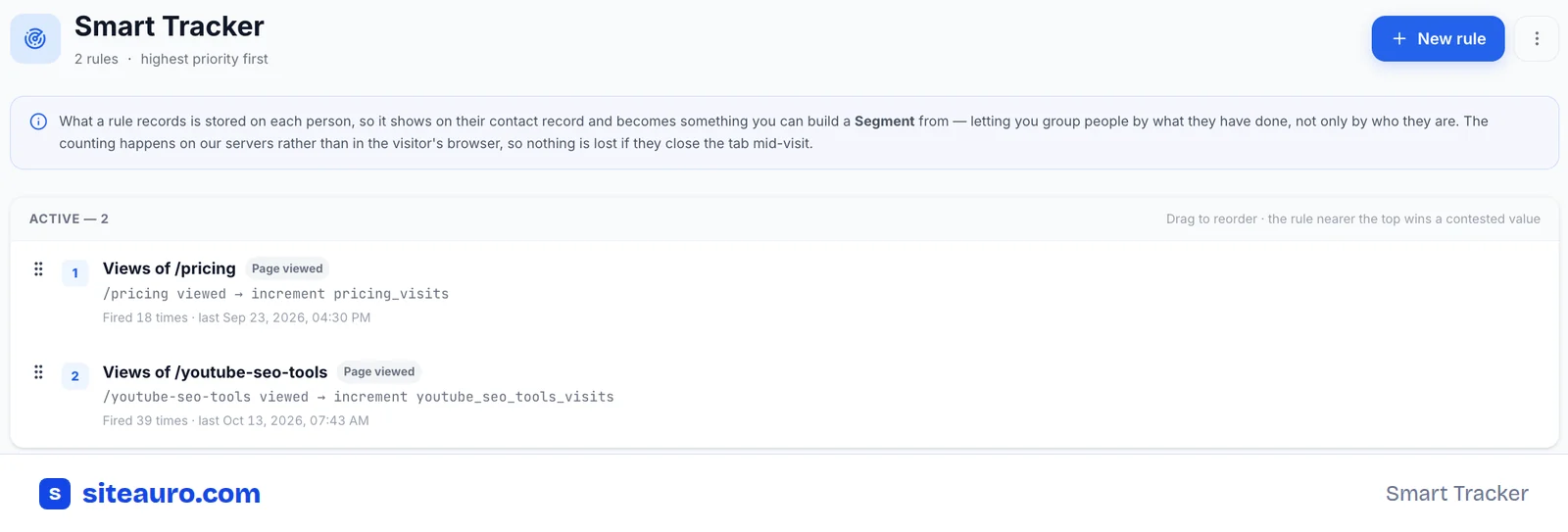
Here's how that looks for VidTechy. Each Smart Tracker rule counts a page view and saves the count on that person's record. So "checked pricing 3 times" stays with them after they sign up.
How to build trial segments from behavior
A trial segment is a group of users who did, or didn't do, the same thing. Build your segments around your activation event, then add pre-signup intent on top.
You don't need twenty segments. These five cover most trials:
| Segment | Rule | What it usually means | Best nudge |
|---|---|---|---|
| Signed up, never connected [X] | No activation event 24 hours after signup | Stuck at setup | In-app flow if they log in, email if they don't |
| High intent, gone quiet | Visited pricing 2+ times before signup, no login for 3 days | Wanted to buy, hit a wall | Short, plain email from the founder |
| Clicking around, not activating | Logged in 2+ times, no activation event | Not sure where to start | In-app flow that asks one question |
| Activated and coming back | Activation event done, active on 3+ days | Getting real value | Upgrade nudge inside the app, offer a call |
| Trial ending, never activated | 3 days left, no activation event | About to be lost | Email offering more time for one action |
The "activated and coming back" group are your product qualified leads. A product qualified lead (PQL) is a trial user whose actions inside your product show they're likely to buy.
Few teams use them. A ProductLed survey of 600+ SaaS companies found only about 25% of product-led companies track PQLs, and the ones that do see roughly 3x higher conversion (ProductLed, via Prospeo). Nutshell, a CRM company, found that trial users who added a teammate, synced their email, or imported their data were 20 times more likely to pay.
Back to VidTechy. Our "signed up, never connected channel" group gets its own path: emails, in-app notifications, and repeat follow-ups. In practice, these aren't cold users. They already showed up. They just stopped one step short.
How this works in SiteAuro
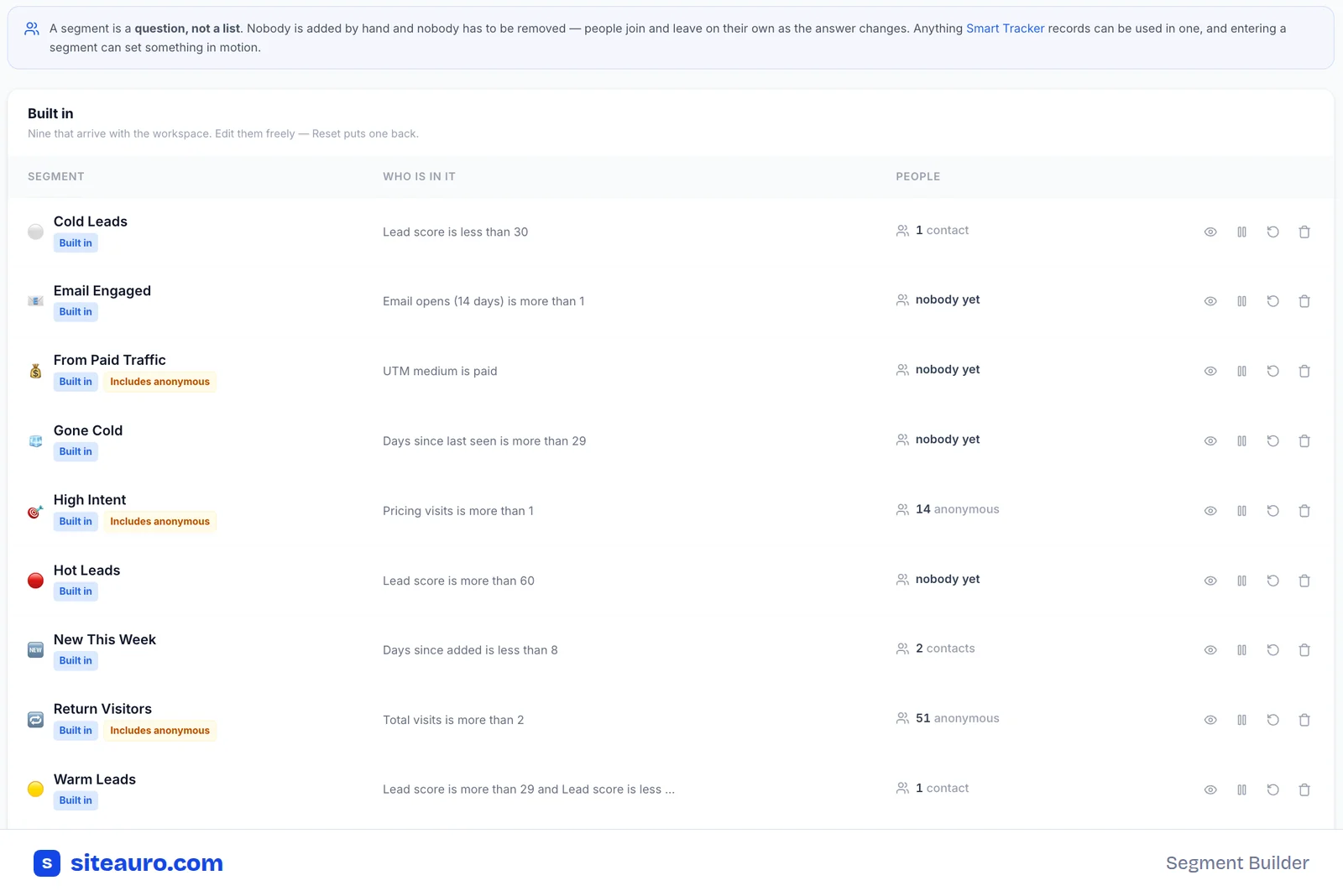
It runs in three layers:
- Smart Tracker records what each user does, before and after signup.
- Segment Builder groups users by rules like "visited pricing 3+ times" or "no activation event after 24 hours."
- Triggers fire when a user enters a segment: an email sequence, an interactive flow, a widget, or personalized content. You can stack more than one trigger on the same segment.
Segments update on their own. Nobody is added or removed by hand. When a user's behavior changes, they move in or out, and the right nudge follows.
You can also send segment changes to your CRM or Slack through Zapier or a webhook. That way your team sees new PQLs as they appear.
Emails vs. in-app nudges: when to use each
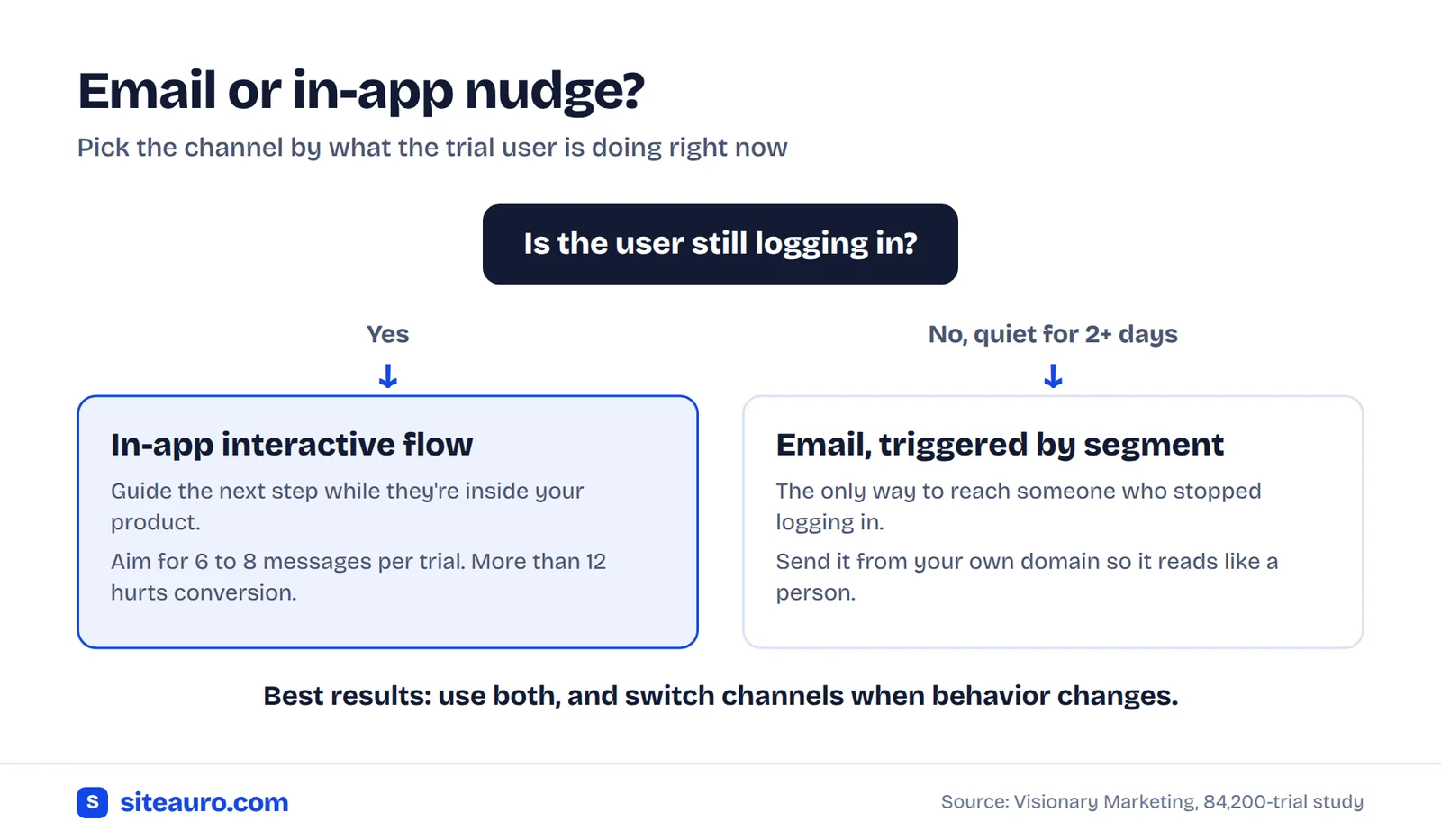
Use in-app nudges for users who still log in. Use email for users who stopped. An in-app message can't reach someone who never comes back.
| In-app nudge | ||
|---|---|---|
| Reaches | Users inside your product right now | Anyone, including users who went quiet |
| Best moment | While they're stuck, or right after a win | After a day or more of silence |
| Good for | Guiding the next step, asking what they need, well-timed upgrade prompts | Bringing people back, personal check-ins, trial expiry |
| Watch out for | Too many messages. Past 12 in one trial, conversion drops | Fixed-schedule emails that ignore what the user did |
In-app nudges work best when behavior sets the timing. The 84,200-trial study found in-app messages lifted conversion by 17% overall. The sweet spot was 6 to 8 messages per trial.
In SiteAuro, in-app nudges are interactive flows. A flow can be a single question, like "What do you want to set up first?" It can also be a multi-step flow that branches based on each answer. A display setting controls where each flow shows: on your website, inside your app, or both.
Email is your way back in when someone goes quiet. SiteAuro's email automations start when a user enters a segment, not on a fixed day. You build them on a drag-and-drop canvas. And because emails send from your own domain, they read like a note from a person, not a blast from a tool.
Often the best answer is both. For "signed up, never connected X," show an in-app flow the next time they log in. If they don't log in for 2 days, send an email instead.
One more lever: a real human. The same study found that one personal touch on day 3 to 5 lifted conversion by 38% for product-led trials. A short founder email to your PQLs counts.
Trial expiration emails that actually convert
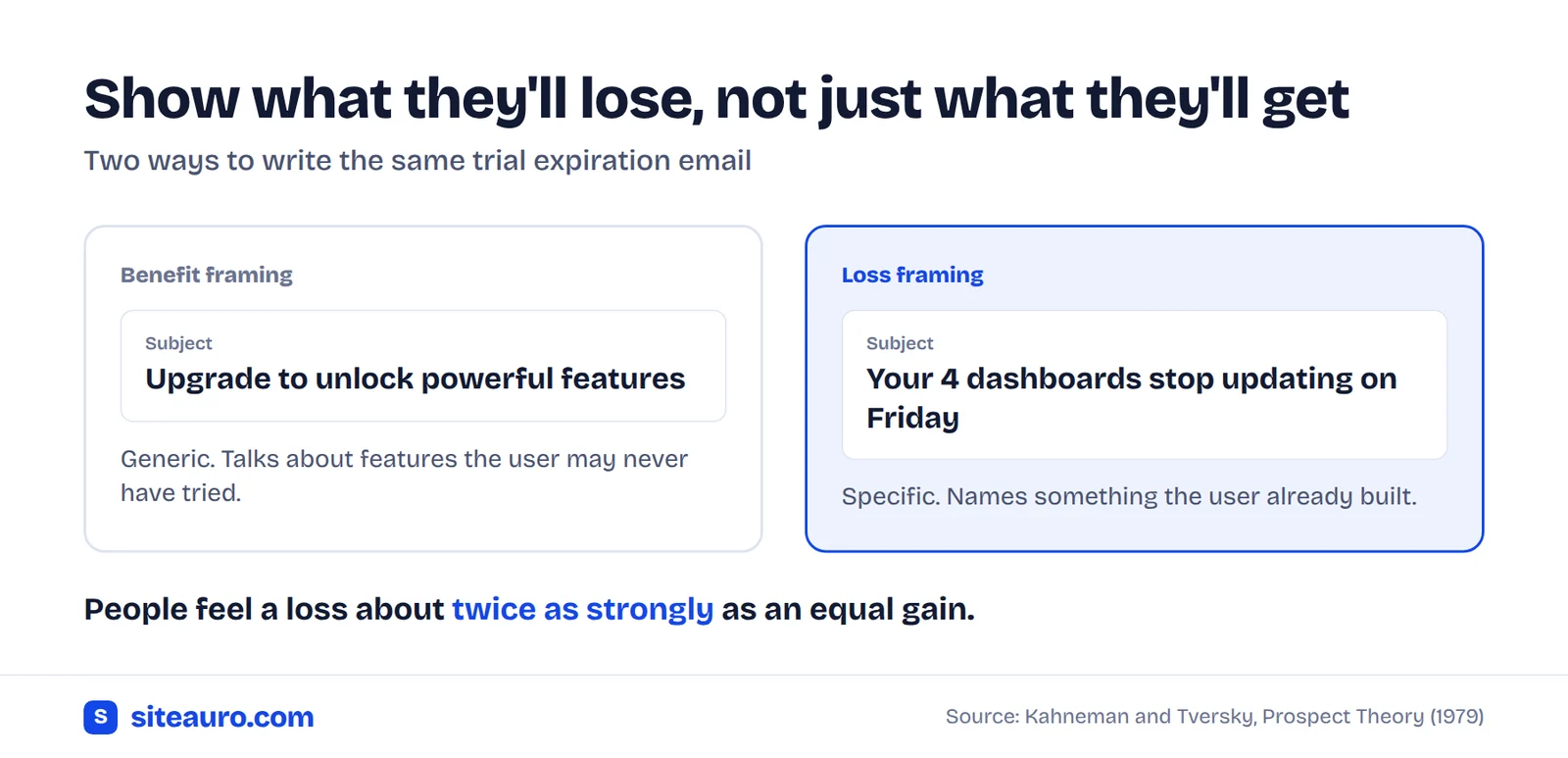
A good trial expiration email shows users what they'll lose, not just what they'll get by paying.
This is called loss aversion. People feel a loss about twice as strongly as a gain of the same size. The idea comes from the work of psychologists Daniel Kahneman and Amos Tversky.
"Upgrade to unlock powerful features" is a benefit. "Your 4 dashboards stop updating on Friday" is a loss. The second one is about something the user already built, so it lands harder.
Three rules keep it honest:
- Only list what the user really did. Pull it from their account. Never pad it.
- Say exactly what happens next. Is their data deleted, locked, or kept for 30 days?
- Give a way out. Offer more time to anyone who didn't get a fair try.
Send three emails: 3 days before the trial ends, on the last day, and 2 days after it ends. Here's an example of the first one for a reporting tool:
Hi Priya,
Your Dashly trial ends this Friday. Here's what you've built so far:
- 4 dashboards
- 2 connected data sources
- 12 weekly reports, sent to 3 teammates
After Friday, your dashboards stay saved for 30 days. But your weekly reports stop sending, and your team will notice on Monday.
Keep everything running in one step:
Pick a plan
Not ready yet? Just reply to this email and I'll add 7 more days.
Sam
Founder, Dashly
Don't send this email to users who never activated. They have nothing to lose yet. Send them an offer of more time, tied to one action, like "Connect your first data source and I'll add 7 days."
A 7-day plan to improve trial to paid conversion
Check your segments every day in week one, and send each nudge only to the users who need it.
This plan assumes a 14-day trial. On a 7-day trial, combine days 3 and 5.
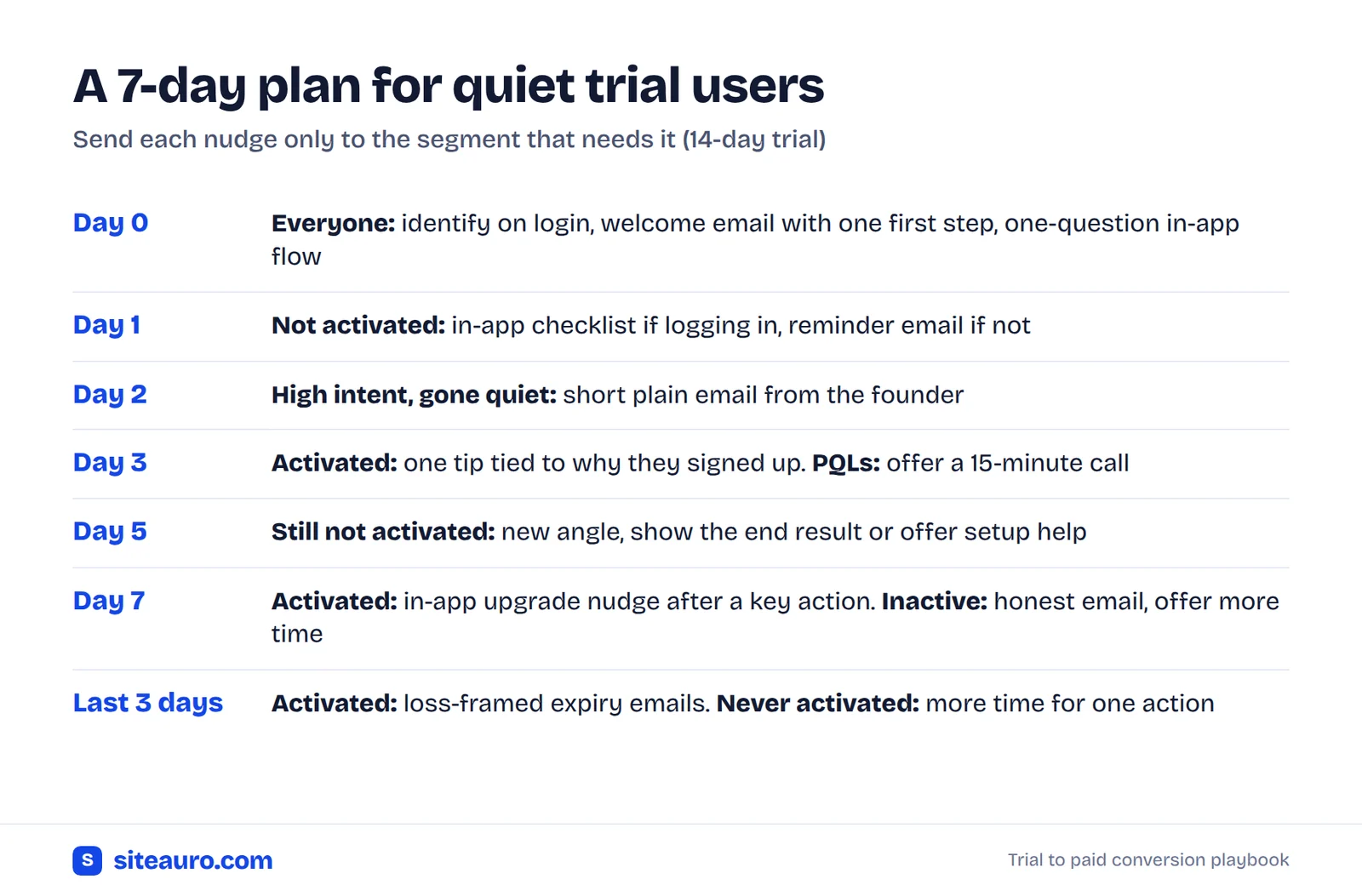
- Day 0Call
Siteauro.identify()on login so pre-signup history joins the account. Send a welcome email with one link to the first action. Show a one-question flow: "What do you want to do first?" - Day 1Not activated yet? If they're logging in, show an in-app checklist flow. If they're not, send an activation reminder email. Nobody else gets it.
- Day 2Check your "high intent, gone quiet" segment. These users checked pricing before signup. Send a short, plain email from the founder asking what got in the way.
- Day 3Activated users get one tip tied to why they signed up, based on the pages they read. PQLs get an offer of a 15-minute call.
- Day 5Still not activated? Try a new angle. Show what the end result looks like, or offer to set it up together.
- Day 7Activated and coming back: show an upgrade nudge inside the app right after they finish a key action. Still inactive: send an honest email asking if the timing is wrong, and offer more time.
- Last 3 daysRun your trial expiration emails for activated users. Send the "more time" offer to everyone else.
Frequently asked questions
What is a good trial to paid conversion rate?
It depends on your trial type. Kyle Poyar, working with ProductLed and ChartMogul, studied 200 B2B products in January 2026 and found a median of 8% across all models. Trials that ask for a credit card convert much higher. In the 84,200-trial study, card-required trials converted at 60.4% and no-card trials at 25.2%, but card trials got far fewer signups. Compare yourself to products with the same trial type.
What is a product qualified lead?
A product qualified lead is a trial or free user whose actions inside your product show they're likely to buy. For example, they finished setup, came back several days in a row, or invited a teammate.
How many emails should a trial nurture sequence have?
About 5 to 7 for a 14-day trial, based on the 84,200-trial study. Fewer than that left results on the table. More than 10 started to hurt. Just as important, each user should only get the emails that match what they did.
Should I use in-app messages or emails for trial users?
Use both, for different users. In-app works for people who still log in. Email is the only way to reach people who stopped. Many teams start in-app and switch to email after 1 to 2 days of silence.
Can I track trial users without a product analytics tool?
Yes. With SiteAuro, the same snippet on your marketing site also runs inside your app. It uses a first-party cookie set through your own domain, so it keeps working in browsers like Safari that limit tracking. You don't need a separate analytics setup to build trial segments.
Quiet trial users aren't lost yet
Most quiet trial users signed up for a real reason, then hit one wall. If you know what they did before and after signup, you can reach them while the trial still matters.
Start small. Pick one activation event and two segments. Get those working, then add more.
Get Your Free Lead Intelligence Map
Enter your website — see exactly how to turn more visitors into leads, and leads into customers.
Get my free mapSources
- Visionary Marketing, SaaS Free Trial Conversion Statistics 2026: An 84,200 Trial Study. Retention curve, activation, email, in-app, human touch and trial-type figures.
- Prospeo, Product Qualified Leads, citing ProductLed's survey of 600+ SaaS companies.
- Nutshell, Product Qualified Leads: Why Trial Users Are So Valuable.
- Userpilot, SaaS Average Conversion Rate, citing Kyle Poyar, ProductLed and ChartMogul (January 2026).
- Happierleads, The Free Trial Is a Lie.
- Kahneman, D. and Tversky, A. (1979), Prospect Theory: An Analysis of Decision under Risk, Econometrica.

Karthick, Founder, SiteAuro
Building SaaS for Lead Generation & Conversion.