

An SEO audit lead magnet is one of the best ways for an agency to get leads from its own website. A visitor enters their URL, gets a free audit, and you get their email.
But most agencies treat that email as the finish line. It's really the starting line.
The audit tells you who is interested. What you do in the next few days decides if they ever book a call. This guide shows how to track audit leads, follow up at the right moment, and close them, all without stitching three tools together.
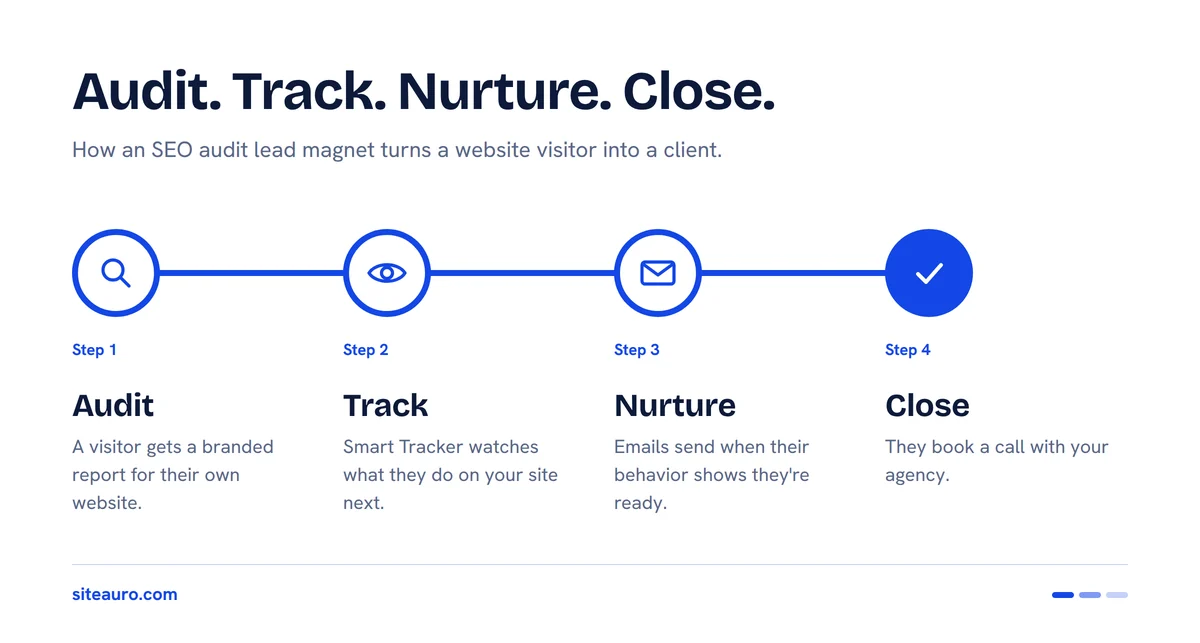
What Is an SEO Audit Lead Magnet?
An SEO audit lead magnet is a free, automated website audit that a visitor gets in exchange for their contact details. It sits on your agency's website as a form or an interactive flow.
The visitor enters their website URL. The tool scans the site and creates a report branded as your agency's own. In SiteAuro, the audit is ready in minutes. It shows on screen and also lands in the visitor's inbox. You get a lead who has just seen proof that their site needs work.
That last part is what makes audits so good for website audit lead generation.
Why Audits Beat Ebooks as Lead Magnets
An audit works better than an ebook because it's about the visitor's own website, not a general topic. Nobody downloads "10 SEO Tips" and feels urgent about it. People do feel something when they see a list of problems on their own site.
An audit gives you three things an ebook can't:
- It's personal by default. Every report is different because every site is different.
- It shows the problem you sell the fix for. The report makes the sales case for you.
- It tells you more about the lead. You get their website, not just an email. You know their issues before you ever talk.
We've built SEO software ourselves, and we've seen this play out. People who audit their own site are already thinking about fixing it. That's a much warmer start than any download.
Where Most SEO Audit Widgets Stop
Most audit widgets are built to do one job: capture the lead. After that, the lead becomes someone else's problem.
The space is crowded. SEOptimer, OUTAUDITS, Insites, WooRank and others all sell embeddable audit tools. SEOptimer says over 2,000 agencies use its lead widget (SEOptimer). OUTAUDITS pitches an audit bar you embed to capture emails around the clock (Product Hunt).
These tools do the audit part well. Most let you use a white label SEO audit widget with your own branding. Some also send a thank-you email with the report attached as a PDF.
The follow-up is where things change. SEOptimer, for example, pushes leads out through Zapier into tools like HubSpot or a Mailchimp drip campaign (SEOptimer). That works. But it leaves two gaps:
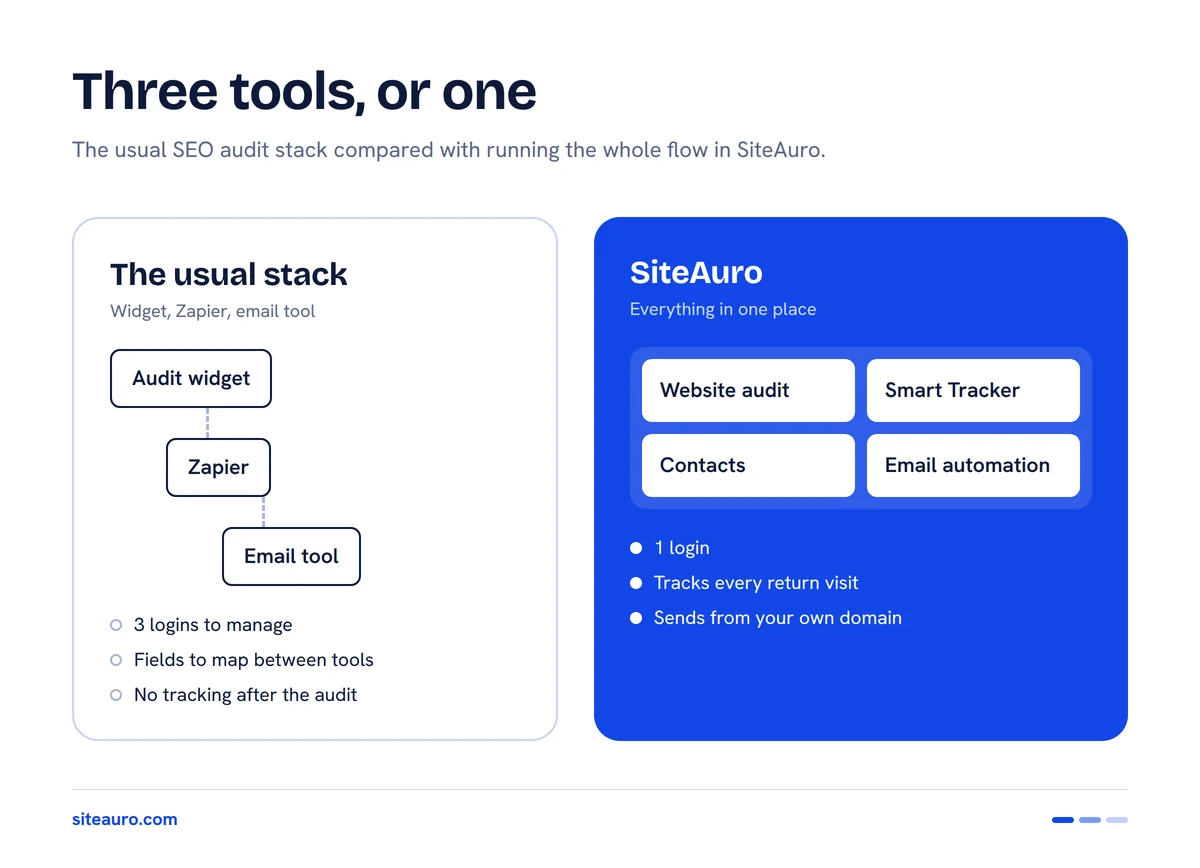
- You manage three tools. The audit widget, Zapier, and an email tool. Each has its own login, its own bill, and its own way to break.
- Nobody watches what the lead does next. The widget records the audit. It doesn't see the lead come back to your pricing page two days later.
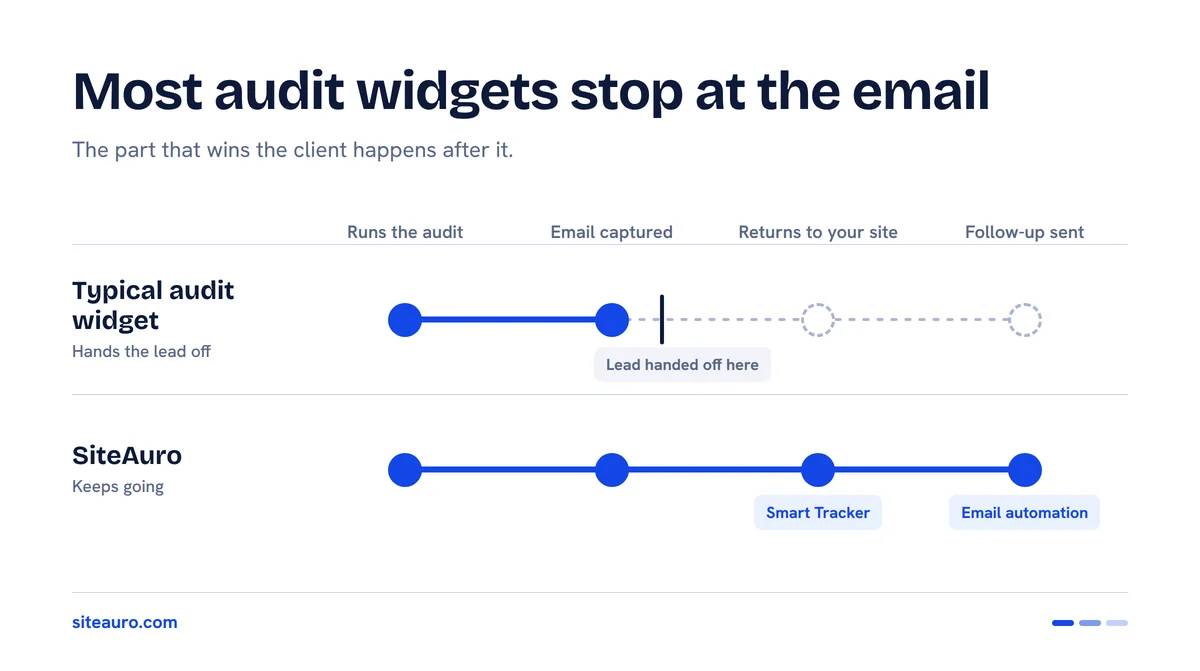
The second gap is the costly one. The moment a lead shows real buying interest is the moment you most want to reach out. Most setups can't see it.
The Audit Widget Stack vs. One Tool
Here's how a typical stack compares with running the whole flow in SiteAuro.
| Audit widget + Zapier + email tool | SiteAuro | |
|---|---|---|
| Tools to manage | 3 or more | 1 |
| Setup | Connect each tool and map fields in Zapier | Audit, tracking, and email in one place |
| Where the lead lives | Split across the widget and your other tools | Contacts, with a status for each lead |
| Tracking after the audit | Usually none | Smart Tracker and Visitor Logs show every return visit |
| What triggers follow-up | The form submission | The submission, or a behavior-based segment |
| Sending domain | Depends on your email tool | Your own domain, through your own SMTP |
Already use other tools you like? SiteAuro supports Zapier and Webhook, so you can still send leads anywhere you want.
Tracking the Lead After the Audit
The most useful data about an audit lead comes after the audit. When a lead comes back to your site, what they look at tells you how ready they are to buy.
SiteAuro's Smart Tracker records what visitors do on your site: pages viewed, return visits, time on site, and engagement. It uses a first-party cookie set through a CNAME record on your own domain. That means it keeps working even with Safari and Firefox tracking limits.
After someone runs an audit, Smart Tracker keeps watching what they do. Every visit shows up in your Visitor Logs, so you see the full story, not just one form fill.
What to Watch After the Audit
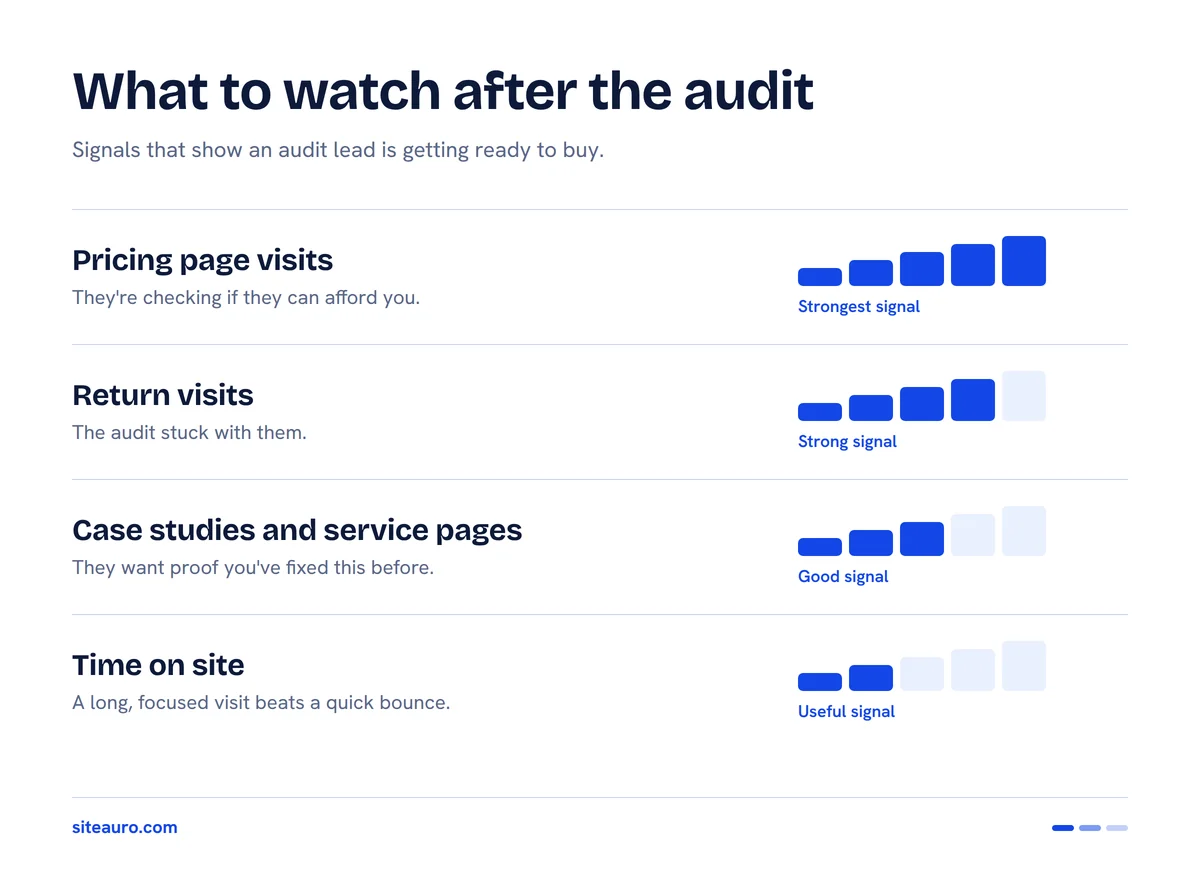
These are the signals that matter most:
- Pricing page visits. The strongest buying signal. They're checking if they can afford you.
- Return visits. Coming back days later means the audit stuck with them.
- Case studies and service pages. They're checking if you've solved this problem before.
- Time on site. A long, focused visit says more than a quick bounce.
Let Segments Do the Sorting
You don't need to check every lead by hand. SiteAuro's Segment Builder groups visitors automatically, based on rules you set.
For example, you can build a segment for audit leads who visited your pricing page two or more times. Anyone who matches lands in that segment. Then the segment can trigger an action, like sending an email.
Nurture Sequences That Turn Audit Leads Into Clients
The best follow-up email arrives right when the lead is paying attention. A fixed drip sends on a timer. A behavior-triggered email sends when the lead actually does something.
Speed matters too. A Harvard Business Review study of about 1.25 million leads found that firms contacting a lead within an hour were nearly 7 times more likely to qualify it than firms that waited just one hour longer (HBR, 2011).
In SiteAuro, an email sequence can start in two ways:
- On lead capture. The moment someone submits their URL.
- On a segment match. The moment a lead's behavior puts them in a segment, like "visited pricing twice."
You build these automations on a drag-and-drop canvas. Because you connect your own SMTP, every email sends from your agency's own domain. It feels personal, not automated.
One Lead, From Audit to Booked Call
Here's what this looks like in practice:
- Monday, 10:02 am. Priya runs an audit on your site. Her report shows slow page speed and missing meta descriptions. She lands in Contacts.
- Monday, 10:03 am. Email 1 sends from your domain. It links her report and explains her top 3 issues in plain words.
- Thursday. She comes back. She reads a case study and visits your pricing page twice.
- Thursday, same visit. That puts her in your "hot audit leads" segment. Email 2 sends: "Saw you were looking at our plans. Want a 15-minute walkthrough of your top 3 fixes?"
- Friday. She books the call.
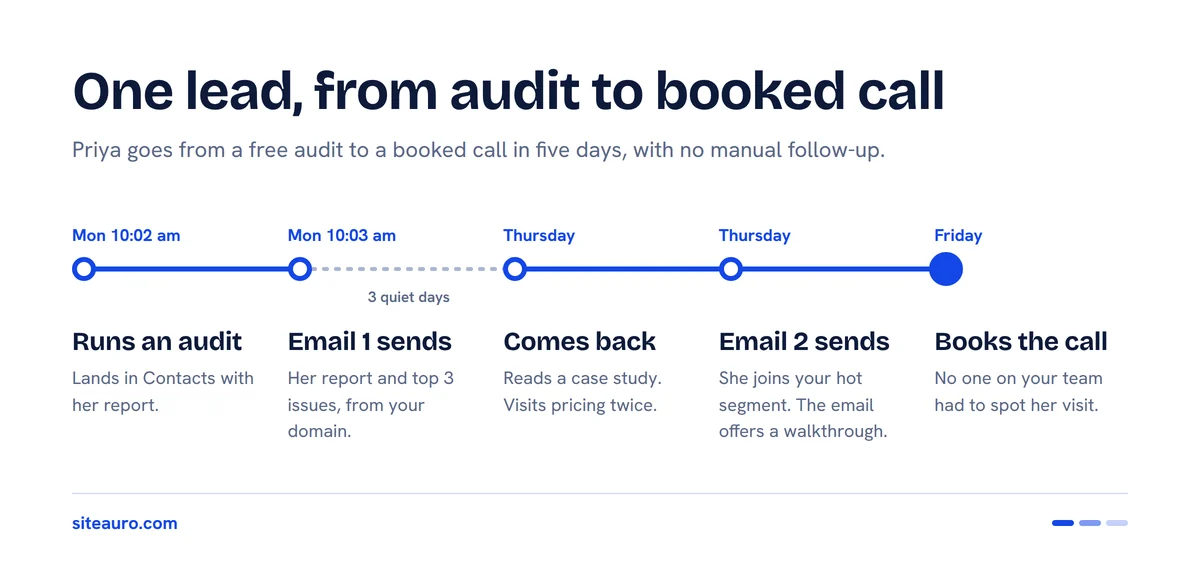
No one on your team had to spot her return visit. The system did.
A Simple 3-Email Sequence to Start With
| When it sends | What it says | |
|---|---|---|
| 1. Report delivery | Right after the audit | Here's your report. These 3 issues matter most. |
| 2. Quick win | Day 3 | One fix they can do themselves today. Builds trust. |
| 3. The invite | When they join your "hot" segment | An offer to walk through the fixes on a short call. |
Keep each email short. One idea, one ask.
How to Set Up an SEO Audit Lead Magnet in SiteAuro
You can set up the full flow in six steps:
- Add the Smart Tracker snippet. Paste the snippet on your site and set the CNAME record so tracking runs on your own domain.
- Set up your branded website audit. Add your agency's brand so every report looks like your own work.
- Connect your SMTP. This lets every email send from your own domain.
- Build your segments. Start with two: all audit leads, and audit leads who visited pricing.
- Create your automations. Start one sequence on lead capture. Start another when a lead joins your pricing segment.
- Watch your leads in Contacts. See each lead's status and step in when they're ready to talk.
Want leads in another tool too? Connect Zapier or a Webhook at any point.
Frequently Asked Questions About SEO Audit Lead Magnets
What is the best SEO audit lead magnet for agencies?
The best one is the one you can follow up on well. Many widgets make good reports. For lead generation for SEO agencies, also look for tracking after the audit and built-in email. Without them, you end up stitching tools together.
How fast should I follow up on an audit lead?
Within the hour if you can. HBR's research found that leads contacted within an hour were far more likely to be qualified (HBR, 2011). Automation sends the first email right away, so you never miss that window.
Can I white-label the audit with my agency's brand?
Yes. In SiteAuro, the audit is delivered under your agency's brand. Follow-up emails also send from your own domain, so the whole experience looks like yours.
Do I need a separate CRM or email tool?
Not for this workflow. Leads land in Contacts with a status, and email automation is built in. If you already use a CRM, connect it through Zapier or a Webhook.
Does SiteAuro work with Zapier?
Yes. SiteAuro supports Zapier and Webhook integrations. You can send lead data out through a webhook and bring data in through the REST API.
The Audit Is the Start, Not the Finish
An SEO audit lead magnet gets your foot in the door. Tracking tells you when the lead is ready. Nurture emails move them to a call. When all three live in one tool, nothing falls through the gaps.
We use this same playbook on our own site. Our Lead Intelligence Map is a free report that scans your website and shows where you're losing leads. It's SiteAuro's own audit lead magnet, and you can try it right now.
Get Your Free Lead Intelligence Map
Enter your website — see exactly how to turn more visitors into leads, and leads into customers.
Get My Free MapSources
- SEOptimer, "Embeddable Audit Tool": seoptimer.com/embeddable-audit-tool
- SEOptimer, "SEO Lead Generation Tool": seoptimer.com/seo-lead-generation-tool
- OUTAUDITS on Product Hunt: producthunt.com
- Harvard Business Review, "The Short Life of Online Sales Leads" (2011): hbr.org

Karthick, Founder, SiteAuro
Building SaaS for Lead Generation & Conversion.