
Email still pays. Litmus research puts the average return at $36 for every $1 spent. But most teams never see that number. Their emails go out on a schedule, to everyone, with the same message.
Email marketing campaigns that convert work differently. They reach the right person at the right moment, based on what that person just did. This guide shows you 12 campaign types with sample emails you can copy. Then it walks you through a simple 8-step process to build your own.
It's written for SaaS founders and SEO agencies. But the ideas work for any business that gets website traffic.
What is an email marketing campaign?
An email marketing campaign is a planned set of emails sent to a group of people to reach one goal. That goal might be a signup, a sales call, an upgrade, or a return visit.
There are two main kinds:
- One-off campaigns go out once to a list. A product launch or a newsletter are good examples.
- Automated campaigns send on their own when someone takes an action. A welcome email after a form fill is the most common one.
The second kind usually converts better. MailerLite found that the first email in an automation had a 53% higher open rate than the average campaign. People open emails they were expecting.
12 email marketing campaigns that convert (with examples)
Each example below follows the same format. You'll see who it's for, what triggers it, a sample subject line, a short sample email, and why it works.
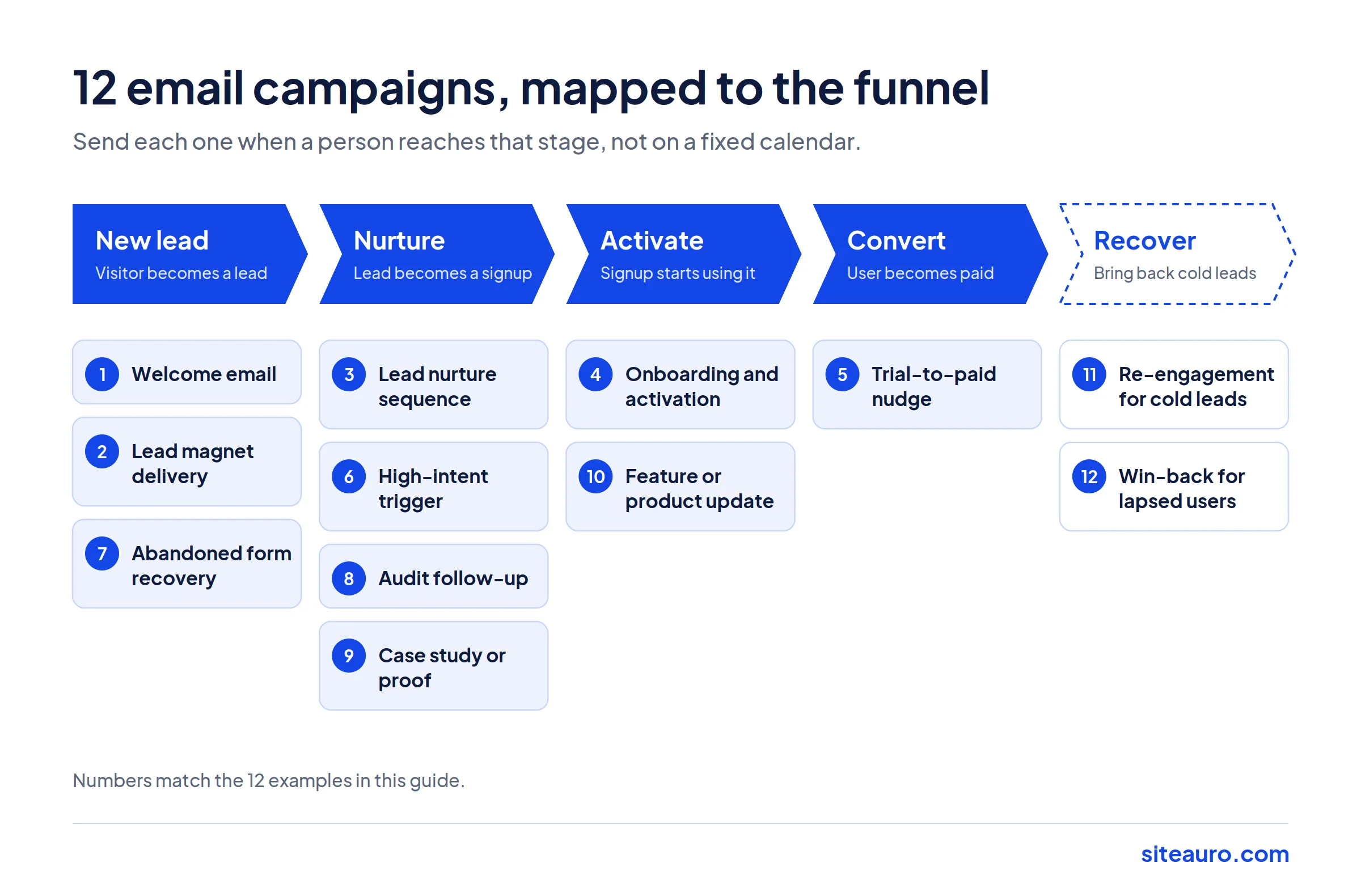
The campaigns are ordered along the funnel. They start with a brand new lead and end with winning back someone who left.
1. Welcome email
Who it's for: SaaS and agencies
Trigger: Someone becomes a lead (fills a form, downloads a guide, takes a quiz)
Subject line: Here's what happens next, {first_name}
Hi {first_name},
Thanks for grabbing the guide. Here it is: [link].
Over the next week, I'll send you 3 short emails. Each one covers one thing you can fix this month.
Quick question: what's the biggest thing slowing your growth right now? Just hit reply. I read every answer.
Karthick
Why it works: The welcome email is the one people expect. It delivers what was promised, sets clear expectations, and asks for a reply. Replies also help your sender reputation.
Tip: Send it within minutes, not hours. A Harvard Business Review study found that firms contacting a lead within an hour were nearly 7 times more likely to qualify that lead than those who waited even one hour longer.
2. Lead magnet delivery
Who it's for: SEO agencies (and SaaS teams with a free tool)
Trigger: A visitor submits their website URL for a free audit
Subject line: Your SEO audit for {website} is ready
Hi {first_name},
Your audit is done. You can see it here: [View your report].
We found 3 issues worth fixing first:
1. 14 pages are missing meta descriptions
2. Your homepage loads in 4.8 seconds on mobile
3. 6 key pages have no internal links pointing to themWant us to walk you through the fixes? Book a 15-minute call: [link]
Why it works: The report is personal. It's about their site, not a general checklist. Pulling the top 3 findings into the email gives them a reason to click, even if they skim.
Tip: Brand the report as your own agency. The prospect should remember your name, not the tool behind it.
3. Lead nurture sequence
Who it's for: SaaS
Trigger: A lead hasn't signed up yet
Subject line (email 2 of 4): The mistake most SaaS sites make on the pricing page
Hi {first_name},
Most visitors who check your pricing page leave without signing up. Not because of price. Because they still have one unanswered question.
Here's a simple fix: add a 3-question FAQ right under your plans. Answer the questions your sales team hears most.
It takes 20 minutes and removes the last reason to wait.
Tomorrow: how to follow up with visitors who leave.
Why it works: Each email teaches one thing. It builds trust before asking for anything. The "Tomorrow:" line gives people a reason to open the next one.
Tip: Keep lead and signup separate in your head. A lead gave you their email. A signup created an account. Nurture emails move people from the first stage to the second.
4. Onboarding and activation (the VidTechy example)
Who it's for: SaaS
Trigger: A user signs up but skips a key setup step
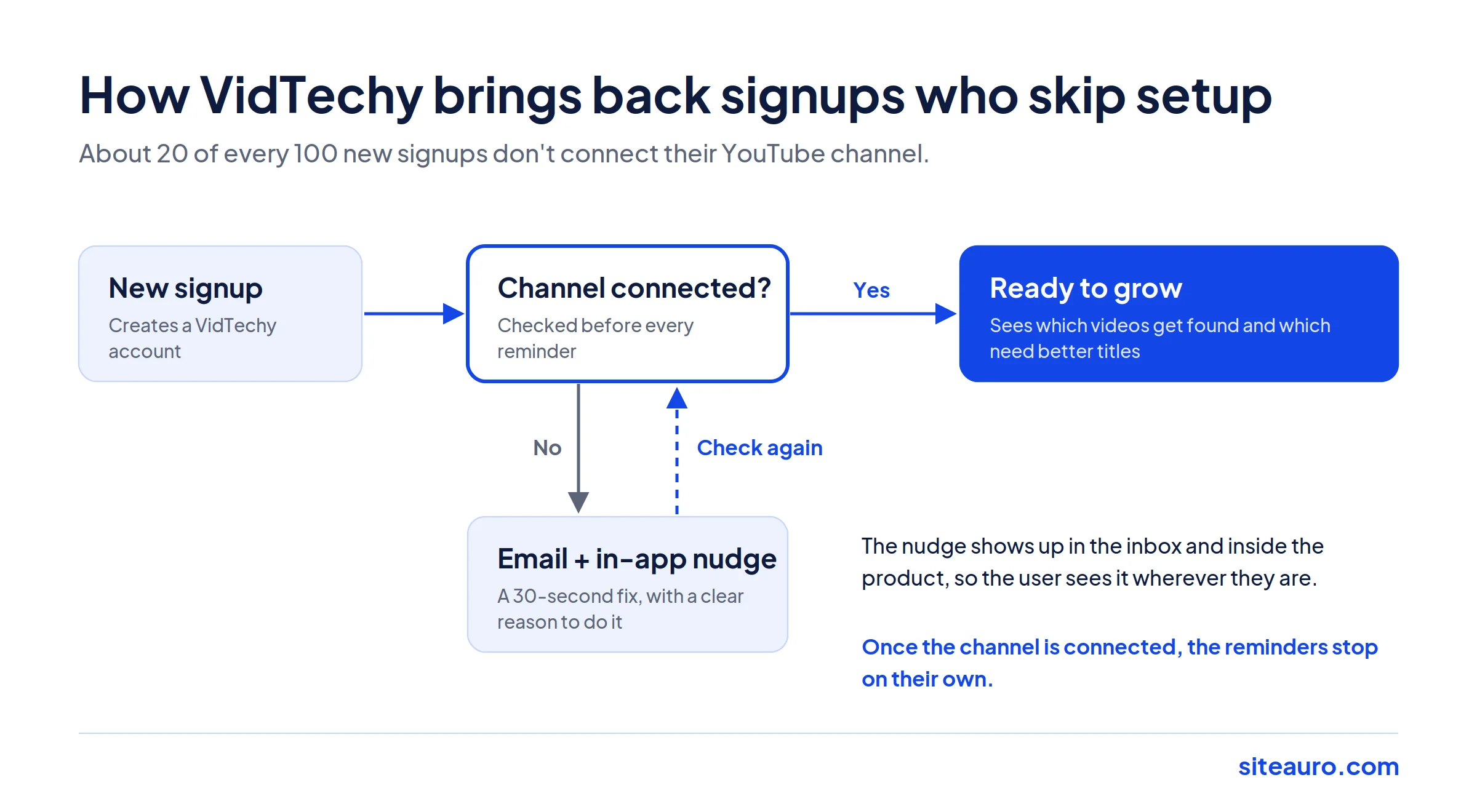
This one comes from our own experience. We run VidTechy, a YouTube growth tool. After signing up, users need to connect their YouTube channel. Without that step, the product can't do much for them.
In practice, we've seen about 20 out of every 100 new signups skip it. So we built a follow-up flow just for them.
Subject line: One step left before VidTechy can help your channel
Hi {first_name},
You're signed up, but your YouTube channel isn't connected yet.
It takes about 30 seconds: [Connect your channel]
Once it's connected, you'll see which of your videos are getting found, and which ones need better titles.
Stuck? Reply to this email and we'll help.
Why it works: It targets one missing action. It shows the time cost (30 seconds) and the payoff (what they'll see). And it pairs with an in-app reminder, so the user sees the same nudge inside the product too.
Tip: Don't send this on a fixed day. Send it when the step is still missing. If the user connects their channel, the follow-ups should stop on their own.
5. Trial-to-paid nudge
Who it's for: SaaS
Trigger: A trial user is active, and the trial ends in 3 days
Subject line: You've used {product} 9 times this week
Hi {first_name},
Your trial ends on Friday. Here's what you've done so far:
- Created 4 reports
- Tracked 1,240 visitors
- Captured 37 new leadsKeep it all running: [Choose a plan]
Why it works: It shows the user their own results. That makes the value real. Losing something you already have hurts more than missing something you never had.
Tip: Send a different email to trial users who barely logged in. They need help, not a sales pitch.
6. High-intent trigger
Who it's for: SaaS and agencies
Trigger: A known lead visits your pricing page 3 or more times
Subject line: Any questions about pricing?
Hi {first_name},
Choosing a plan can be tricky. If you're comparing options, I'm happy to help you pick the right one.
Here's a 15-minute slot on my calendar: [link]
Or just reply with your question.
Why it works: Repeat visits to pricing are one of the clearest buying signals. A short, helpful email at that moment feels like good timing, not a pushy follow-up.
Tip: Never say "We saw you visited our pricing page 3 times." It feels creepy. Just offer help.
7. Abandoned form or signup recovery
Who it's for: SaaS and agencies
Trigger: A visitor starts a form or signup but doesn't finish
Subject line: Still want your free audit?
Hi {first_name},
Looks like your audit request didn't go through. No problem.
You can finish it here in one click: [Get my audit]
Why it works: The person already showed interest. The email removes friction and gives them a one-click way back.
Tip: This only works if you captured their email early in the form. Put the email field first.
8. Audit follow-up (for agencies)
Who it's for: SEO agencies
Trigger: 3 days after the audit was delivered, with no call booked
Subject line: The easiest fix on your audit
Hi {first_name},
Of the issues in your audit, one is quick to fix: your missing meta descriptions.
Fixing them won't change your rankings overnight. But it can lift your click-through rate from Google.
If you'd like a hand with the bigger issues, here's my calendar: [link]
Why it works: It gives away a free win first. That builds trust. The call offer comes second, and it feels earned.
Tip: Send 2 to 3 follow-ups, each focused on a different finding from the audit.
9. Case study or proof email
Who it's for: SaaS and agencies
Trigger: A lead has read 2 or more emails but hasn't taken the next step
Subject line: How [client name] got more calls from the same traffic
Hi {first_name},
Quick story. [Client name] was getting traffic but very few calls.
They added a free audit to their homepage and an automated follow-up. Within [timeframe], inbound leads went from [X] a month to [Y].
Here's exactly what they changed: [Read the story]
Why it works: Proof from someone like them beats any claim you make about yourself.
Tip: Use real numbers and real names, with permission. A vague story ("a client saw great results") does very little.
10. Feature or product update
Who it's for: SaaS
Trigger: You ship something new that solves a known request
Subject line: You asked for this
Hi {first_name},
A lot of you asked for a way to send follow-ups from your own domain. It's live now.
Here's how to set it up in 5 minutes: [Watch the walkthrough]
Why it works: It frames the update around the user's request, not your roadmap.
Tip: Send it only to users who would care. A feature for agencies shouldn't go to every SaaS user.
11. Re-engagement for cold leads
Who it's for: SaaS and agencies
Trigger: A lead hasn't clicked anything in 60 to 90 days
Subject line: Should I stop emailing you?
Hi {first_name},
I haven't heard from you in a while, so I want to check in.
If you'd still like tips on getting more leads from your website, click here: [Yes, keep me on the list]
If not, no hard feelings. I'll remove you in 7 days.
Why it works: It's honest and gives a clear choice. People who click are warm again. People who don't leave your list, which keeps it healthy.
Tip: Actually remove the people who don't respond. A smaller, active list protects your sender reputation.
12. Win-back for lapsed users or lost deals
Who it's for: SaaS and agencies
Trigger: A paid user cancels, or a deal is marked as lost
Subject line: A lot has changed since you left
Hi {first_name},
When you left, you mentioned [reason]. We've worked on that.
Here's what's new: [2 to 3 short points]
If you want to take another look, your old setup is still saved: [Log back in]
Why it works: It shows you listened. It addresses their actual reason for leaving.
Tip: Wait 30 to 90 days before sending. Too soon feels desperate.
Get Your Free Lead Intelligence Map
Enter your website — see exactly how to turn more visitors into leads, and leads into customers.
Get my free Lead Intelligence MapHow to create email marketing campaigns that convert (8 steps)
Good campaigns follow the same process. Here's how to build one from scratch.
Step 1: Pick one goal per campaign
Every campaign should have one clear goal. "Book a call" is a goal. "Build awareness and drive signups and get feedback" is three goals, and it will do all three poorly.
Write the goal down before you write a single email.
Step 2: Know your ideal customer
Your ideal customer profile is a clear picture of who gets the most value from what you sell. Look at your best customers. What job do they have? What problem made them buy? What words do they use to describe it?
Use their words in your emails. It's the fastest way to sound relevant.
Step 3: Build your list the right way
The best list is one you build yourself, from people who chose to hear from you. Capture emails on your website with something useful: a free audit, a tool, a guide, or a short quiz.
Never buy email lists. Bought contacts didn't ask to hear from you. They mark you as spam, which hurts your ability to reach everyone else.
Step 4: Segment by behavior, not just by name
Segmentation means splitting your list into groups so each group gets a more relevant message. Basic segments use job title or company size. Better segments use behavior.
Here's the difference:
| Basic segment | Behavior-based segment |
|---|---|
| "Marketing managers" | "Visited pricing page 3+ times this week" |
| "Companies with 10 to 50 people" | "Downloaded a guide but never signed up" |
| "Trial users" | "Trial users who haven't completed setup" |
Behavior tells you what someone wants right now. That's what makes a message land.
Step 5: Match each email to the funnel stage
People need different emails at different stages. A simple way to map it:
- Visitor to lead: Offer something useful in exchange for an email.
- Lead to signup: Nurture with short, helpful emails. Build trust.
- Signup to active user: Guide them through setup. Remove blockers.
- Active user to paid customer: Show the value they've already gotten.
Some visitors skip straight to signup. That's fine. Your system should handle both paths.
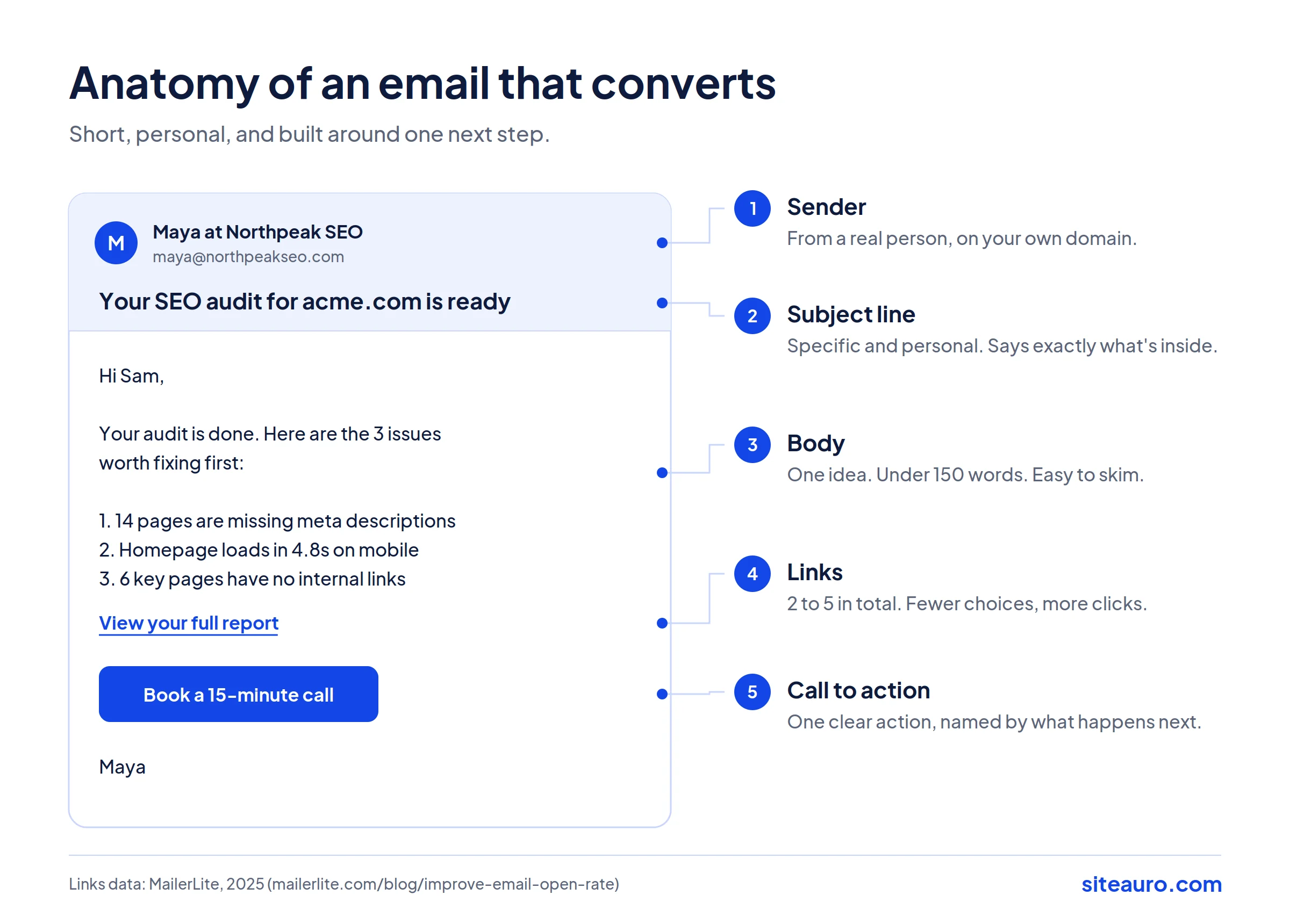
Step 6: Write short emails with one clear CTA
Keep most emails under 150 words. Ask for one thing. Make the button or link obvious.
Fewer links tend to help too. MailerLite's data shows emails with 2 to 5 links had the highest open and click rates, while emails with 20+ links performed worst.
Step 7: Protect your deliverability
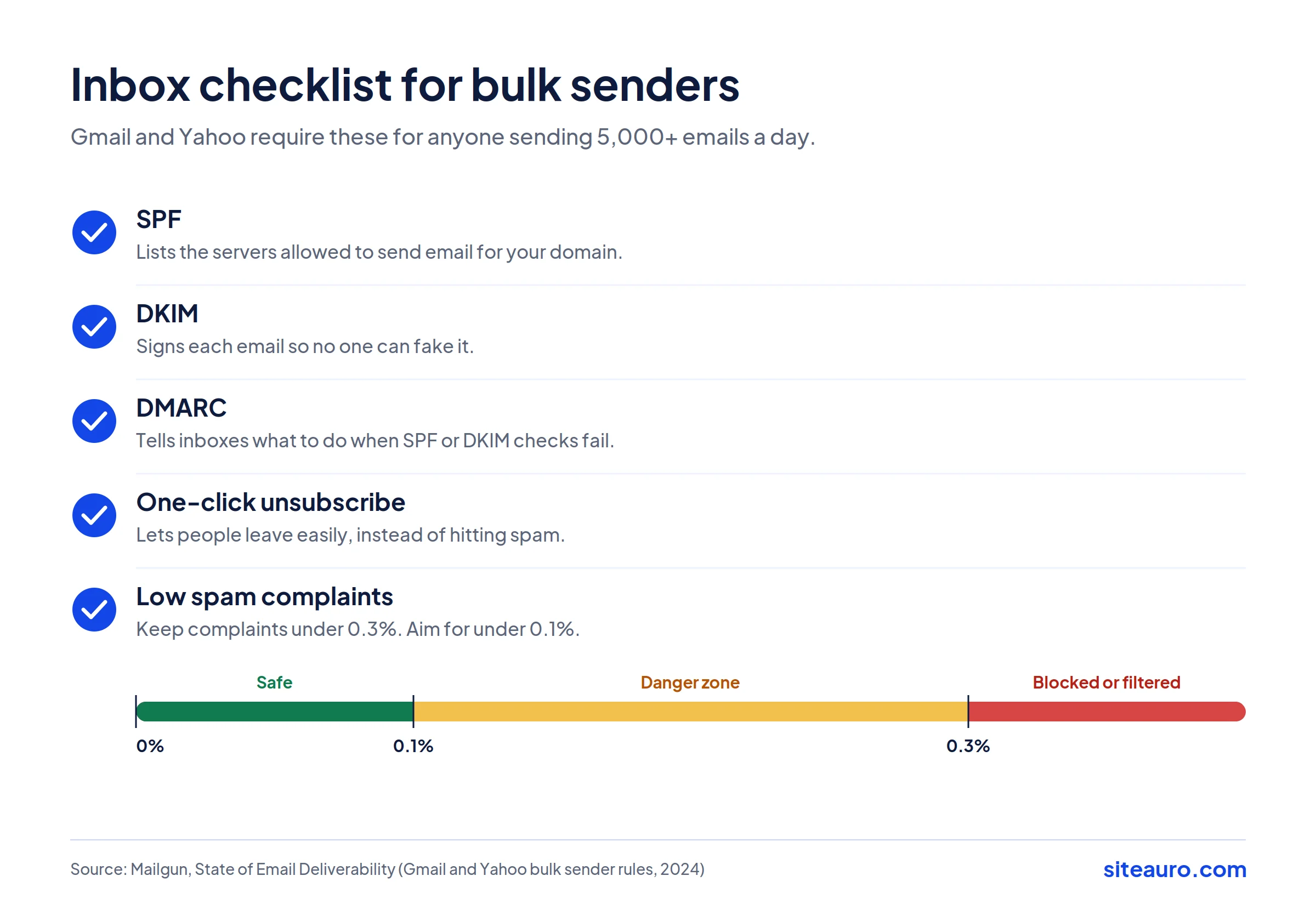
Deliverability is whether your email actually reaches the inbox. Since 2024, Gmail and Yahoo require bulk senders to set up SPF, DKIM, and DMARC, offer one-click unsubscribe, and keep spam complaints under 0.3%.
In plain terms:
- SPF, DKIM, and DMARC prove the email really came from you. Your domain host or email provider can help you set them up.
- One-click unsubscribe lets people leave easily, so they don't hit "spam" instead.
- Low complaints mean you're only emailing people who want your emails.
Sending from your own domain also helps. Emails from yourcompany.com build trust. Emails from a shared sending domain don't.
Step 8: Test, measure, and improve
Change one thing at a time. Test subject lines, send times, or CTAs. Keep what works.
Then look at the right numbers. That's the next section.
Email marketing metrics to track
Not all metrics tell the truth. Here's what to watch and what to be careful with.
| Metric | What it means | What to watch for |
|---|---|---|
| Open rate | % of people who opened | Inflated by Apple Mail Privacy Protection. Use it as a trend, not a target. |
| Click rate | % of people who clicked a link | Your most honest engagement signal. |
| Click-to-open rate | % of openers who clicked | Shows if your email content and CTA worked. |
| Conversion rate | % who did the thing you wanted | The metric that matters most. |
| Bounce rate | % of emails that couldn't be delivered | High bounces point to a bad list. |
| Unsubscribe rate | % who opted out | A spike means the message or timing was off. |
| Spam complaint rate | % who marked you as spam | Keep it well under 0.3%. |
Why be careful with opens? Apple's Mail Privacy Protection loads emails in the background. That can count an email as opened even when no one read it.
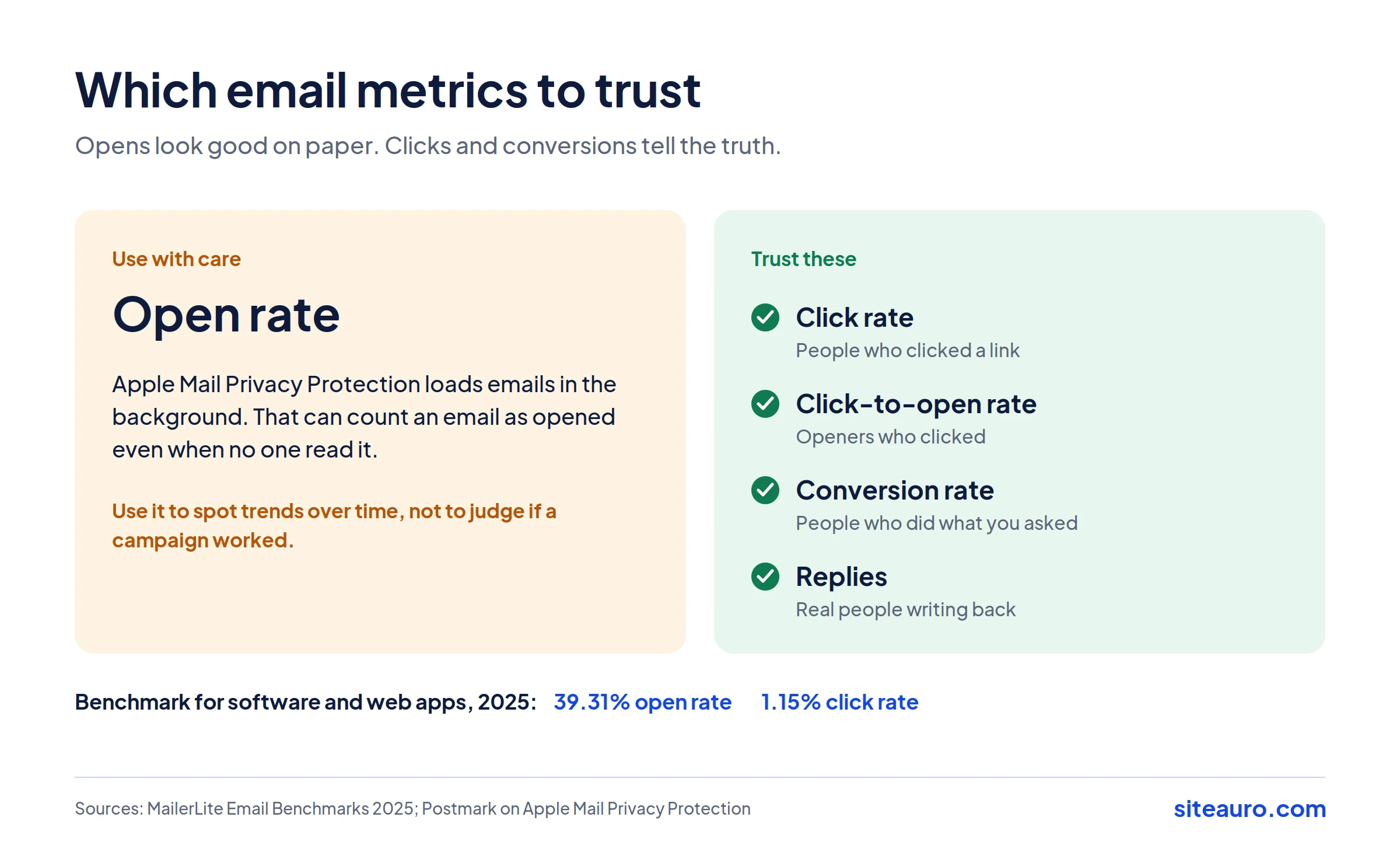
For context, MailerLite's 2025 benchmarks across 3.6 million campaigns show an average click rate of 2.09%. For software and web apps, the benchmark was a 39.31% open rate and a 1.15% click rate.
Common email campaign mistakes
Most failing campaigns make one of these mistakes:
- Sending the same email to everyone. Relevance drives clicks. One message for all means it's relevant to no one.
- Asking for too much. Three CTAs in one email split attention. Pick one.
- Stopping after one email. Most people need more than one touch. Plan a sequence.
- Buying lists. It hurts deliverability for your real subscribers.
- Judging success by opens. Track clicks and conversions instead.
- Sending on a calendar, not on behavior. "Every Tuesday" ignores what your leads are actually doing.
How SiteAuro helps you build email automation that converts
Most of the campaigns above depend on one thing: knowing what each visitor did. That's the gap SiteAuro fills.
SiteAuro is a visitor intelligence and lead generation platform. Here's how it handles email:
- It sees behavior first. The Smart Tracker records what each visitor does on your site: pages viewed, time on site, and intent signals.
- It groups visitors for you. Segment Builder sorts visitors by behavior, like "visited pricing 3+ times" or "abandoned a form."
- It triggers emails on behavior. Email sequences start on lead capture, or on any segment match. So campaign #6 (high-intent) and #7 (abandoned form) run on their own.
- It sends from your own domain. You connect your own SMTP. Emails come from you, so they feel personal, not automated.
- It tracks every lead. A lead dashboard shows the status of each contact, so you know who's moving and who's stuck.
- It shows what's working. Email Analytics shows how each campaign and sequence performs, so you can keep the winners and fix the rest.
- It connects to your stack. Zapier and Webhook send lead data wherever you need it.
For SaaS teams, there's one more piece: one snippet, two jobs. The same tracking snippet works on your marketing site and inside your logged-in product. That means the same system can send nurture emails before signup and onboarding nudges after signup, like the VidTechy flow in example #4.
For SEO agencies, SiteAuro turns a visitor's website URL into a branded SEO audit under your agency's name, then follows up automatically. That's campaigns #2 and #8, running without you.
Get Your Free Lead Intelligence Map
Enter your website — see exactly how to turn more visitors into leads, and leads into customers.
Get my free Lead Intelligence Map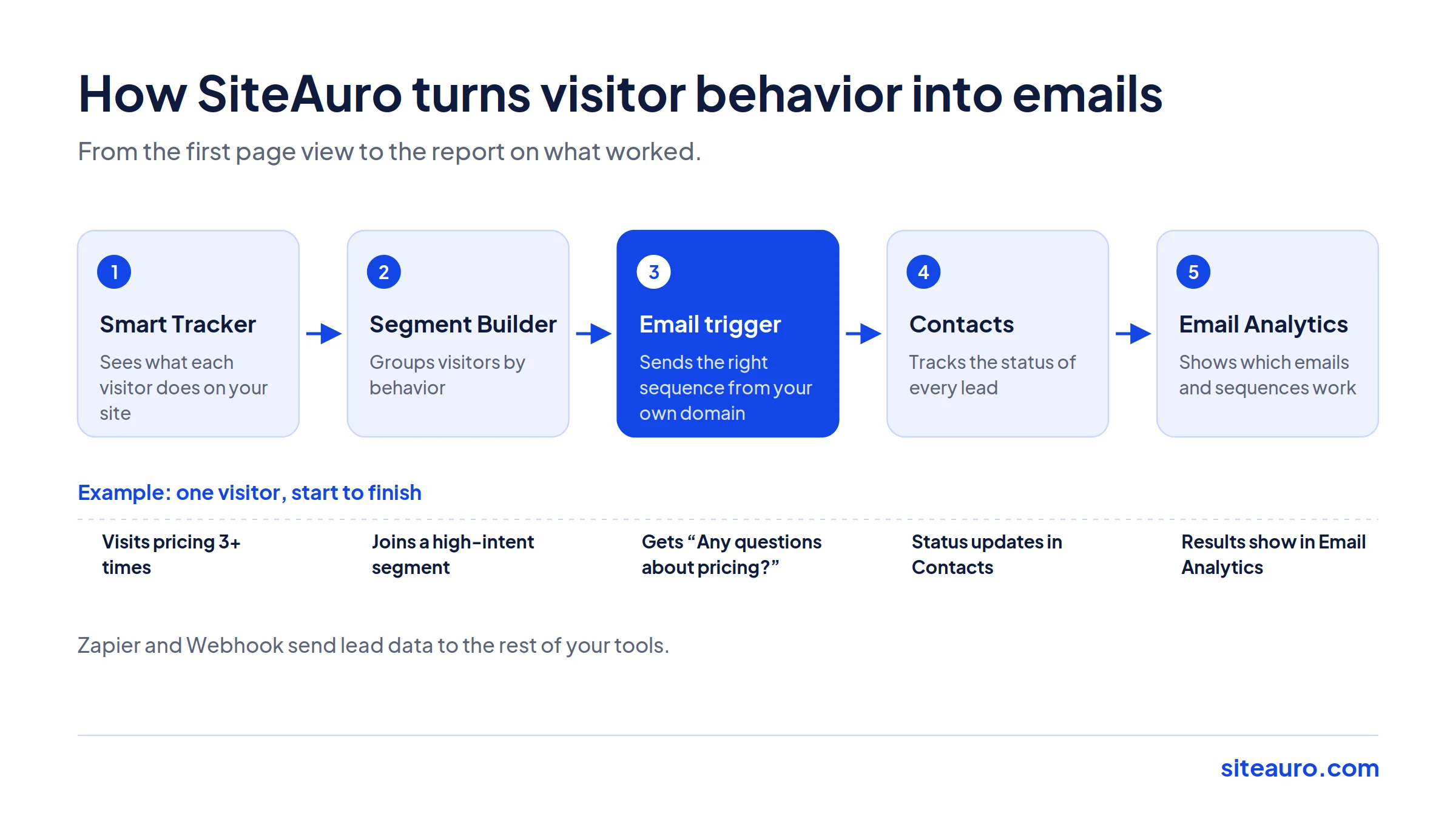
Email marketing campaign FAQ
How many emails should a nurture sequence have?
Most nurture sequences work well with 3 to 6 emails. Start with 4. Each email should teach or solve one thing. Stop the sequence as soon as the person takes the action you wanted, like signing up.
What is a good open rate for B2B email?
A good open rate depends on your industry. MailerLite's 2025 data shows a benchmark of about 39% for software and web apps. But open rates are inflated by Apple Mail Privacy Protection, so click rate and conversions are better signs of success.
How often should I send marketing emails?
Send as often as you have something useful to say. For most B2B teams, that's once a week for newsletters. Automated emails are different. They send when a trigger happens, so timing depends on the person, not the calendar.
What's the difference between email marketing and email automation?
Email marketing is the broad practice of using email to reach customers. Email automation is one part of it. It sends emails on their own when someone does something, like filling a form or skipping a setup step.
Do I need a separate email tool if I already have a CRM?
Not always. Many CRMs can send basic emails. But a CRM usually only knows what happens after someone becomes a contact. If you want emails triggered by website behavior, like a pricing page visit or an unfinished form, you need something that tracks that behavior too. Some tools now combine visitor tracking, a contacts list, and email automation in one place, so you don't have to connect three separate systems.
The takeaway
Email marketing campaigns that convert aren't about sending more email. They're about sending the right email when someone is ready for it.
Start with one campaign from this list. The welcome email or the high-intent trigger are good first picks. Get it working, measure clicks and conversions, then add the next one.

Karthick, Founder, SiteAuro
Building SaaS for Lead Generation & Conversion.