
Most teams try to fix a weak popup by changing the timer. Wait 5 seconds. Then 10. Then 30.
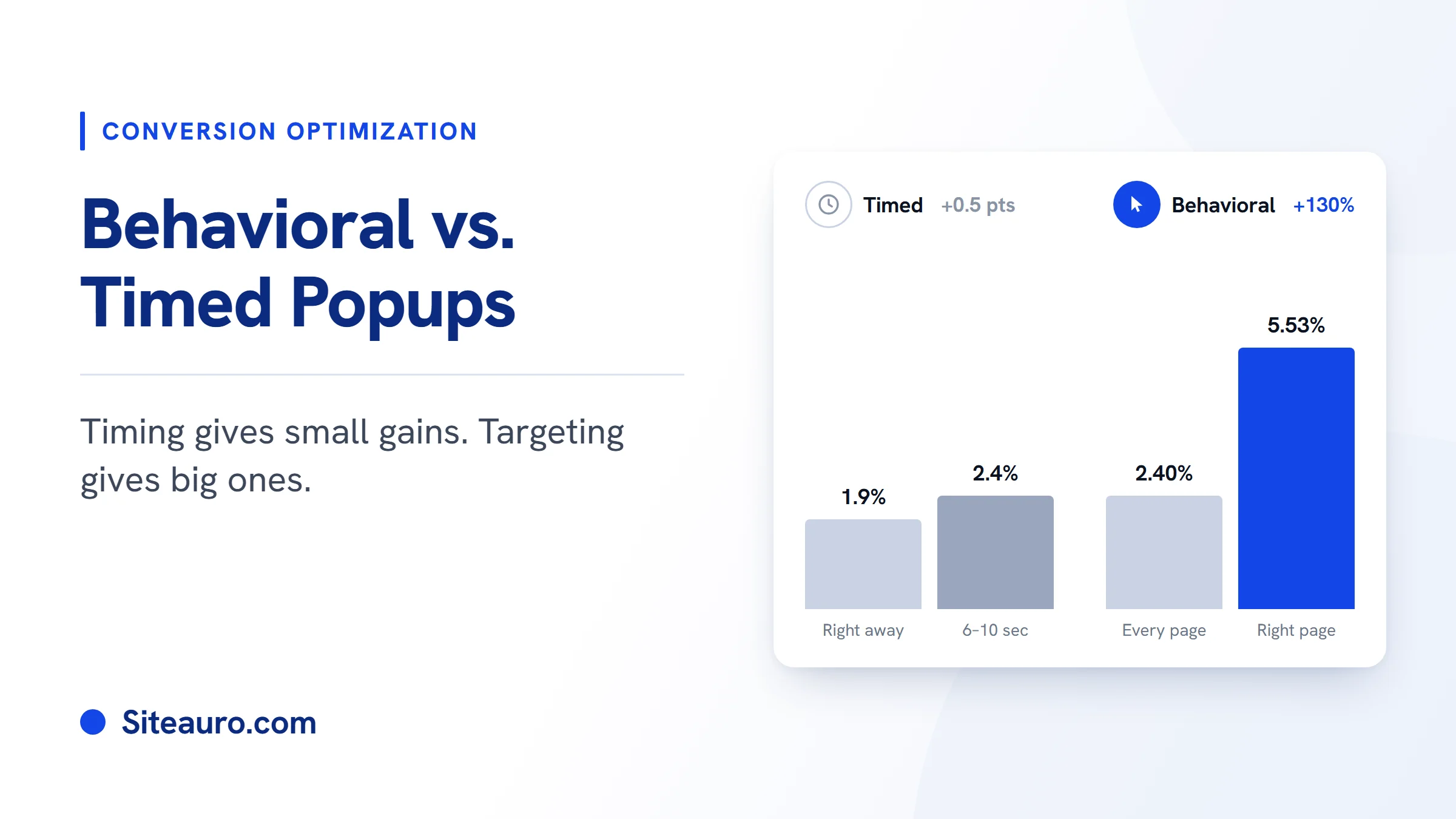
The data says this barely matters. The best delay lifts conversions from about 1.9% to 2.4%. Behavioral popups, which show up based on what a visitor does, do much better. Popups aimed at specific pages convert at more than double the rate of untargeted ones.
This guide covers what behavioral popups are, what the numbers say, which triggers work best for SaaS and SEO sites, and why one popup is rarely enough.
What is a behavioral popup?
A behavioral popup is a message that shows when a visitor does something specific on your site. That could be visiting your pricing page, reading a third blog post, or clicking a button.
A timed popup is a message that shows after a set number of seconds. It shows the same way to every visitor, no matter what they are doing.
The difference is simple. A timed popup knows how long someone has been on the page. A behavioral popup knows what they came for.
| Timed popup | Behavioral popup | |
|---|---|---|
| Shows when | A timer runs out | A visitor takes an action |
| What it knows | Time on page | Pages viewed, clicks, scroll depth, return visits |
| Same message for everyone? | Yes | No, it changes with behavior |
| Main risk | Shows at the wrong moment | Needs a bit of setup |
Timed vs. behavioral popups: what the data says
Timing helps a little. Targeting helps a lot. Here is what the public data shows.
Timing gives small gains
Omnisend's 2026 data found that popups delayed 6 to 10 seconds converted at 2.4%. Popups that fired right away converted at 1.9%. Popups delayed past 30 seconds dropped back to 1.8 to 1.9%.[1]
So the best timer adds about half a percentage point. It's worth setting. It's not worth obsessing over.
Timing matters more for what it prevents. Wisepops reports that popups shown in under 5 seconds can raise bounce rate by up to 5 times.[2] A good delay mostly stops you from annoying people before they read a single line.
Targeting gives big gains
Wisepops analyzed one billion popup displays in 2026. Popups targeted to specific URLs converted at 5.53%. Popups without URL targeting converted at 2.40%. That's 130% higher.[3]
Behavior over time matters too. Waiting until a visitor's second page view or later raised median conversion by 39 to 52%.[2]
Not every kind of targeting helps equally, though. The same dataset found that general "custom targeting" lifted conversions by only 2.3%.[3] The signals that work best are tied to intent: the page someone is on, how many pages they've seen, and what they clicked.
A fair caveat
Most popup data comes from popup tool vendors and their customers, and many of them are online stores. B2B sites convert lower overall: about 2.01%, compared with 6.88% for ecommerce.[1]
So treat these numbers as a direction, not a promise. The direction is clear, though. What a visitor does tells you more than how long they've been on the page.
Common popup triggers and when to use them
A popup trigger is the event that makes a popup appear. Here are the triggers that matter most, with an example for SaaS teams and SEO agencies.
| Trigger | What it tells you | SaaS example | SEO agency example |
|---|---|---|---|
| Page (URL) | What topic they care about | On the integrations page, ask which tools they use | On the technical SEO page, offer a free audit of their site |
| Pages viewed | How serious they are | Viewed pricing 3+ times: ask about team size | Read 2 audit-related posts: offer a free SEO audit |
| Scroll depth | They're reading closely | Reached the end of a feature page: offer a quick walkthrough | Finished a case study: "Want results like this for your site?" |
| Click | They asked for it | A "See what you'd save" button opens a short flow | A "Check my site" button starts the audit request |
| Exit intent | They're about to leave | Engaged visitor leaving pricing: ask what's missing | Engaged reader leaving: offer the audit one last time |
| Return visit | They came back | Returning non-signup sees social proof | Returning visitor sees reviews from past clients |
Click triggers stand out. Wisepops data shows on-click popups averaging 37.34%, compared with 3.93% for popups shown on landing.[4] When someone clicks, they've already said yes.
A note on exit intent popups
Exit intent popups are popular, but they're weak on their own. Wisepops puts on-exit popups at 2.87%, lower than popups shown on landing.[4]
They work better with an extra condition. Wisepops itself suggests showing them only to visitors who've viewed 3 or more pages.[2] In practice, that means fewer exit popups, shown to people who actually care.
Why one popup isn't enough
Even a well-targeted popup is still one message for one moment. Real visitors move through stages. A first-time reader, a repeat pricing-page visitor, and a lead who already shared their email all need different things.
This is the problem SiteAuro is built to solve. It works in three layers:
- Smart Tracker records what each visitor does: pages viewed, time on site, and engagement.
- Segment Builder groups visitors by that behavior. For example, "visited pricing page 3+ times" or "abandoned a form."
- Triggers decide what each group sees. One segment can run several triggers at the same time.
Interactive flows, not just popups
Most tools stop at the popup. SiteAuro uses interactive flows instead. An interactive flow can be one simple question. It can also be a full multi-step flow that branches based on each answer, built with drag and drop.
Steps help. Wisepops data shows multi-step popups convert at 5.17%, compared with 4.62% for single-step ones.[5] Each small answer makes the next one easier. You also learn more about the visitor along the way.
Widgets that change by segment
SiteAuro's on-page widgets include social proof, reviews, a conversion counter, and a survey. Many tools offer widgets like these. The difference is that Segment Builder controls who sees which one.
A first-time visitor might see reviews. A repeat pricing-page visitor might see a live counter of signups today. Same page, different message, based on behavior.
Email follow-up after the lead
A lead is not a signup yet. A lead is someone who shared their contact details. A signup is someone who created an account.
SiteAuro's built-in email sequences fill that gap. They can start when a lead is captured, or whenever a visitor matches a segment. Emails send from your own domain through your own SMTP, so they feel personal, not automated. That's how a lead turns into a signup over time.
Behavioral triggers after signup (for SaaS)
For SaaS teams, behavior still matters after signup. Trial users need a reason to become paying users.
SiteAuro's In-App Mode lets the same tracking snippet run inside your logged-in product. When a user logs in, their account links to everything they did before signing up. We call this "One snippet, two jobs."
That means you can set triggers on in-app behavior. A trial user who opened the billing page twice could see an upgrade prompt. A user who hasn't finished setup could get an onboarding flow or a nudge email. You choose whether each popup or widget shows on your website, inside your app, or both.
A quick ecommerce example
The same idea works for online stores. Say a shopper views the same product twice in one week but doesn't buy.
On their next visit, a social proof widget shows how many people bought it today. Or a conversion counter shows how many are left. No discount needed, just the right nudge for someone who's already interested.
Behavioral popups FAQ
What is the difference between a timed popup and a behavioral popup?
A timed popup shows after a set number of seconds. A behavioral popup shows when a visitor does something, like visiting a key page or clicking a button. Because behavioral popups match what the visitor is doing, they usually convert better.
Do exit intent popups still work?
Yes, but not well on their own. Wisepops data puts on-exit popups at 2.87%, below popups shown on landing.[4] They work better when shown only to engaged visitors, such as people who've viewed 3 or more pages.
What is the best popup timing?
If you use a timer, 6 to 10 seconds tends to work best. Omnisend data shows 2.4% in that range, compared with 1.9% for popups that fire right away.[1] In practice, the trigger matters more than the exact number of seconds.
Are behavioral popups annoying to visitors?
They're less annoying than timed popups, because they respond to something the visitor did. A click-triggered popup only appears when someone asks for it. Showing fewer, more relevant messages keeps the experience calm.
Do behavioral popups work for B2B and SaaS sites?
Yes. B2B sites convert at lower rates overall, so every relevant message counts more. Pricing-page visits, repeat visits, and feature-page reads are strong buying signals. For SaaS, behavior inside the product after signup is just as useful.
Get Your Free Lead Intelligence Map
Enter your website — see exactly how to turn more visitors into leads, and leads into customers.
Get My Free MapSources
- Crazy Egg, "50+ Popup Statistics" (citing Omnisend 2026 data): crazyegg.com/blog/popup-statistics
- Wisepops, "The Ultimate Guide to Popup Targeting [2026]": wisepops.com/blog/guide-to-popup-targeting
- Wisepops, "20+ Popup Statistics 2026 [Based on 1B Displays]": wisepops.com/blog/popup-stats
- Wisepops, "38 Types of Popups to Convert Visitors": wisepops.com/blog/types-of-popups
- Wisepops, "Multistep Popups: Expert Guide": wisepops.com/blog/multistep-popups

Karthick, Founder, SiteAuro
Building SaaS for Lead Generation & Conversion.